

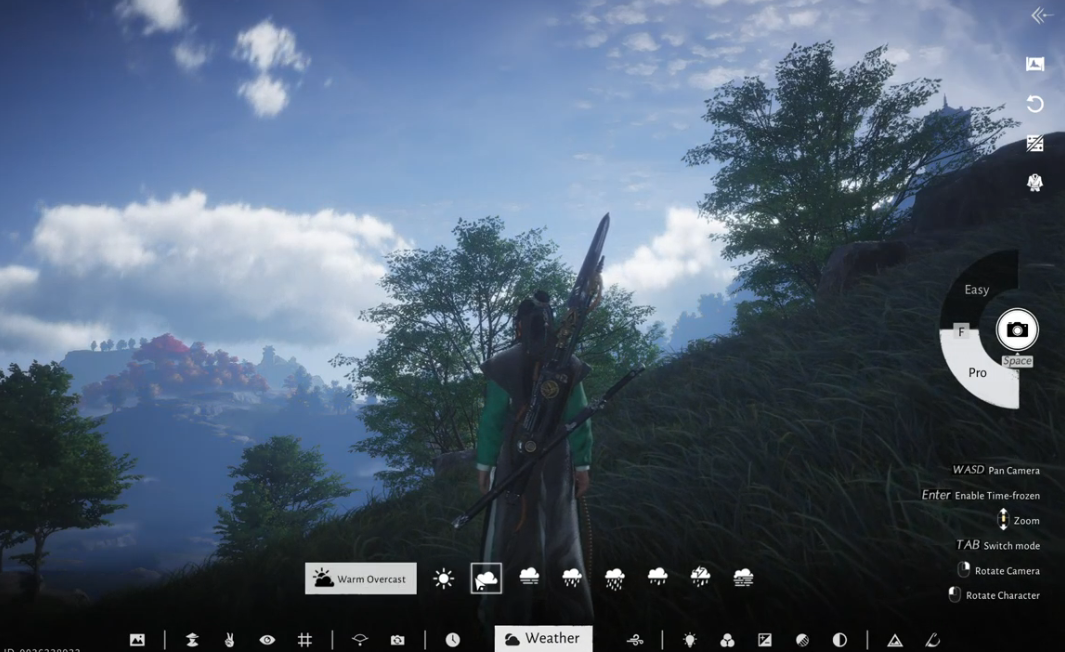
Learn how to trigger quests more reliably in Where Winds Meet by using the in-game Camera to adjust time and weather. Some quests depend on specific environmental conditions or NPC schedules, and this method helps you activate them quickly without waiting for natural changes.
In Where Winds Meet, many quests only appear when the world is set to the right conditions; an NPC might show up only at dawn, certain encounters may require clear skies or rain, and some objectives won’t progress until the next in-game day. Instead of waiting for these changes to occur naturally, you can use the in-game Camera feature to adjust time and weather instantly.
This guide explains how time and weather influence quest activation and shows you how to use the camera tools to ensure quests trigger exactly when you need them.
How to change time and weather using the in-game camera
Go to the Menu tab on the top right corner of the screen.

Click the Camera icon, or you can simply press F8 (default key) to open the in-game camera.

From here, you can manipulate the time and weather to your liking. Press TAB to change modes within the camera interface. Exit the camera and walk toward the quest trigger point.
Screen recording by: NerdsChalk
This method works for many timed encounters, quests, and NPC events that refuse to spawn under normal circumstances.
Why time and weather matter for quest triggering
Many quests in Where Winds Meet are tied to the world’s simulation system.
Time of day
NPCs follow daily schedules:
- Some appear only early morning.
- Others spawn after sunset.
- Certain encounters require the next in-game day to progress, so you may need to wait.
Weather conditions
Weather influences ambiance and occasionally quest logic:
- Some quests specify the weather in their description.
- Others quietly require fog, rain, clear skies, or dusk lighting to spawn an event.
- Weather can also affect whether certain objects or animals appear.
How to change the time in Where Winds Meet
Screen recording by: NerdsChalk
Go to the Menu tab on the top right corner of the screen. click on the time icon and set the time according to your need.
We hope this guide on How to Trigger Quests in Where Winds Meet Using the Camera Glitch offered all the clarity you were looking for and made your experience smoother. If you have any feedback, suggestions, or questions, drop them in the comments below. We actively read and respond, so feel free to reach out whenever you need extra help or guidance.




