What to know
- Hytale does not yet have a permanent, built-in HUD for coordinates or biome names
- A debug-style info screen can be accessed via keybinds in some builds
- Mods and server tools provide the most reliable coordinate and biome displays
- Biomes are tied to zones and can still be identified visually without UI help
When you’re exploring, building, or navigating long distances in Hytale, knowing your exact coordinates and current biome can make a big difference. While the game doesn’t yet mirror Minecraft’s always-on debug overlay, there are still practical ways to access this information depending on how you play.
How biome visibility works in Hytale
Hytale’s current user interface focuses on immersion rather than raw data. There is no permanent toggle in the settings that keeps coordinates or biome names visible while you play. This applies whether you are in single-player or on official-style survival servers.
| Feature | Vanilla gameplay | Debug screen | Mods / servers |
|---|---|---|---|
| X, Y, Z coordinates | Not visible | Yes (temporary) | Yes (HUD or chat) |
| Biome name | Not visible | Yes (temporary) | Yes (HUD) |
| Always on-screen | No | No | Yes |
| Requires setup | No | No | Yes |
However, the game does include an internal information overlay intended for testing and diagnostics.
How to view coordinates and biome using the debug screen
In some early access and testing builds, a debug-style screen can be accessed with a function key. Press F7 on your keyboard. In some cases, this requires a quick double press rather than holding the key.
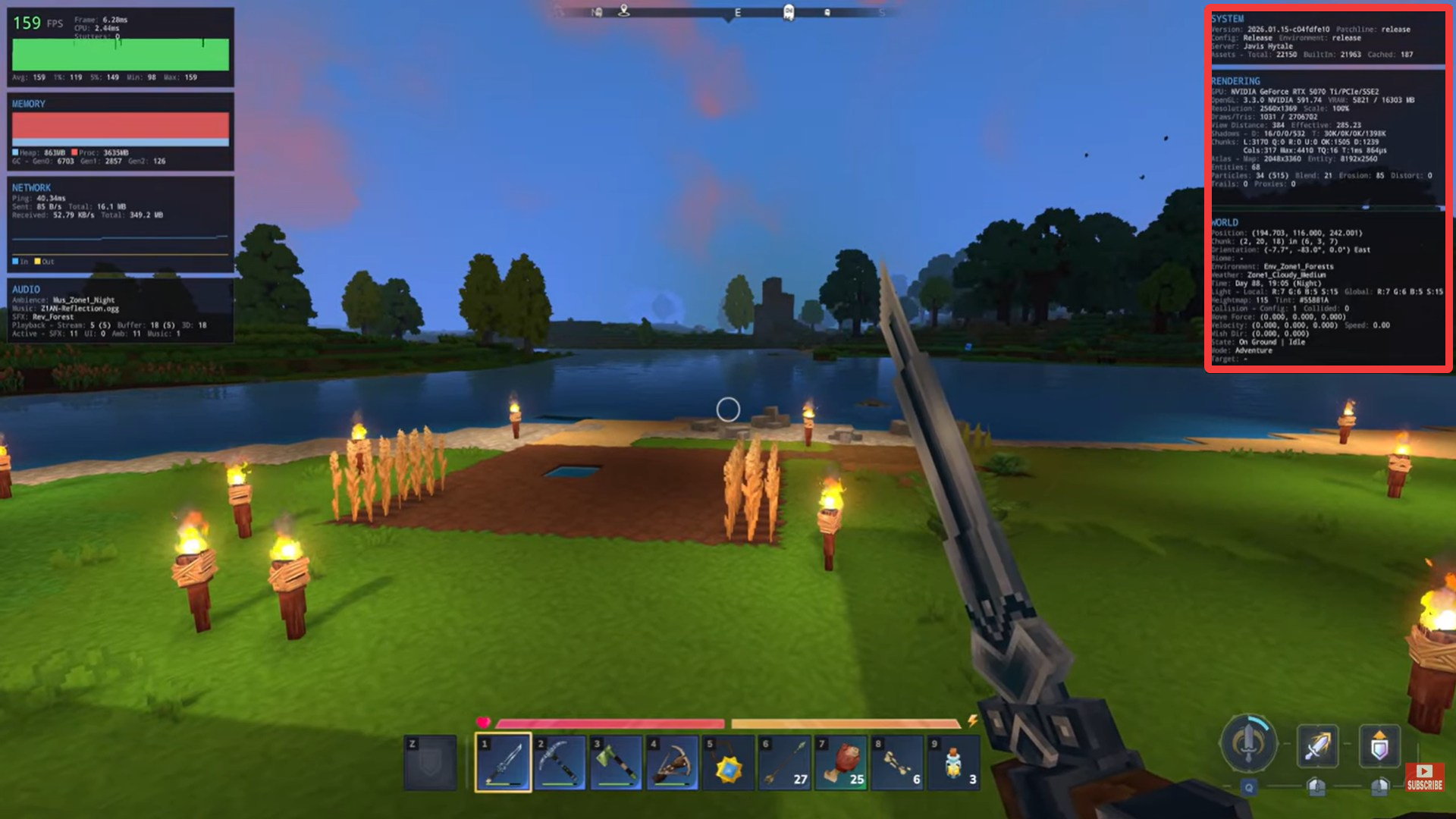
Look for the World Information section of the overlay. This typically shows:
- Current X, Y, Z position
- Chunk location
- Facing direction
- Environment or biome
- Zone tier (such as early, mid, or high danger zones)
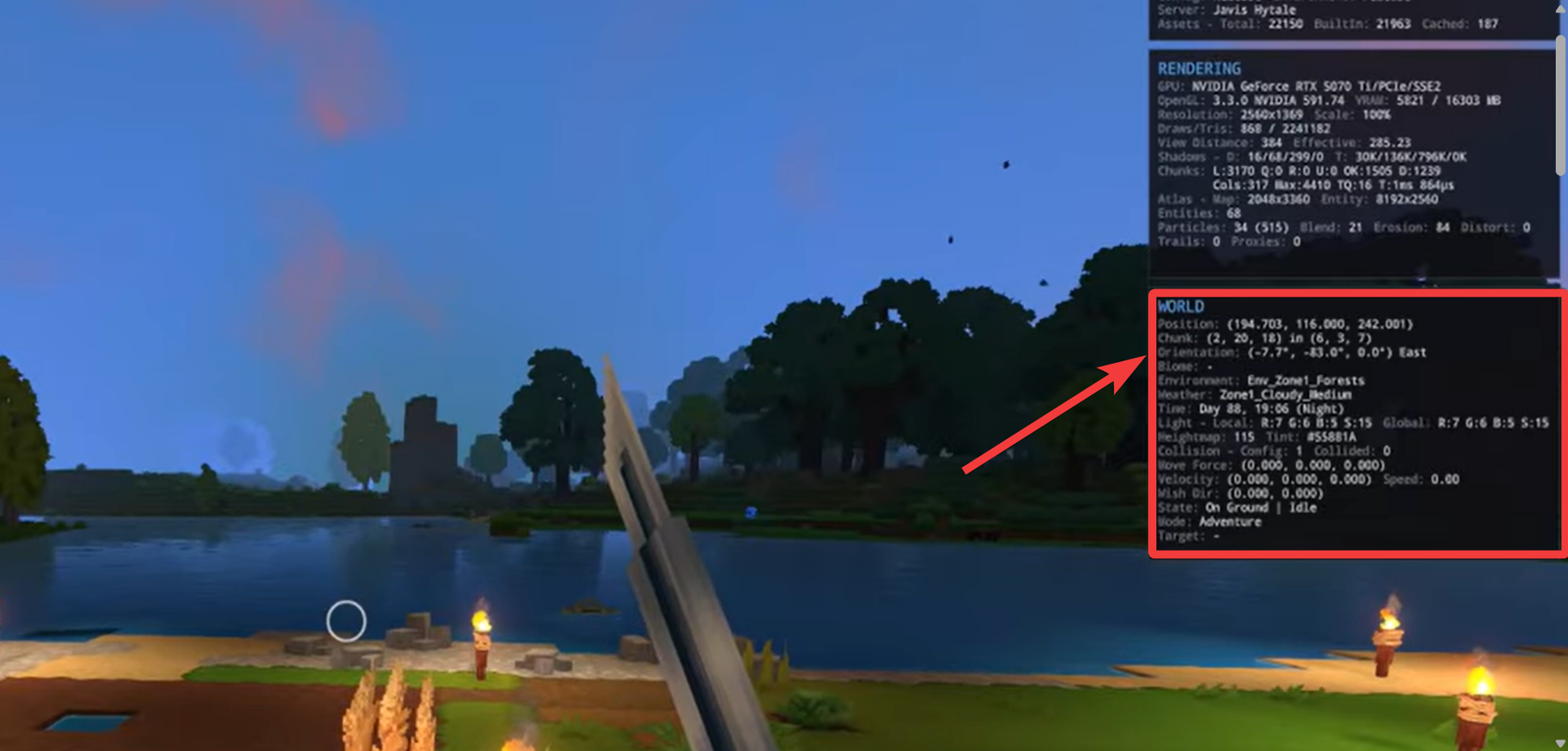
Use the information as needed, then close the overlay. The screen is temporary and does not stay on during normal gameplay.
This method is useful for quick checks but is not designed as a navigation tool.
How mods provide permanent coordinate and biome HUDs
If you want constant access to coordinates and biome names, mods are currently the most reliable option. Community-made HUD mods add small overlays that remain visible as you move.
These mods usually display:
- Real-time X, Y, Z coordinates
- Current biome name
- Sometimes zone number or region data
Once installed, the information updates live without opening any menus, which is especially helpful for large builds, mapping projects, or survival navigation.
How servers and commands can show coordinates
On private or modded servers where you have admin permissions, coordinate information can also be accessed through commands.
- Ensure the server supports position or debug commands.
- Use a command such as a position lookup to print your current coordinates in chat or the console.
- Repeat as needed while navigating or teleporting.
This approach is common on custom servers but varies depending on server configuration.
How to identify your Hytale biome without UI tools
Even without mods or debug screens, you can still determine your biome through environmental cues. Biomes in Hytale are nested within zones, and each has distinct traits.
| Biome | Visual & Terrain Cues | Natural Signs (Plants, Mobs, Atmosphere) |
|---|---|---|
| Emerald Grove (Forest) | Green grass, rolling hills, rivers | Oak-like trees, flowers, deer, bright lighting |
| Plains / Meadows | Flat grassy land, open sightlines | Tall grass, flowers, passive animals |
| Desert | Sand, red sand, sandstone terrain | Cacti, dry shrubs, scarce water |
| Savanna | Dry yellow grass, cracked dirt | Acacia-style trees, sparse vegetation |
| Jungle | Uneven ground, dense foliage | Tall trees, vines, insects, darker lighting |
| Swamp | Muddy ground, shallow water | Reeds, mushrooms, fog, slimes |
| Snowy Tundra | Snow-covered land, ice | Pine trees, snowfall, cold ambience |
| Mountains | Steep stone cliffs, high elevation | Thin vegetation, exposed rock, hostile mobs |
| Caves (General) | Underground stone layers | Mushrooms, low light, echoing sounds |
| Crystal Caves | Crystal-embedded stone | Glowing crystals, ambient light |
| Ocean / Coast | Large water bodies, sand shores | Waves, fish, coral, aquatic mobs |
| Dark Forest | Dense terrain, low visibility | Twisted trees, eerie lighting, hostile mobs |
Common indicators include:
- Terrain shape and elevation
- Vegetation types and density
- Ambient lighting and color tone
- Creatures and enemy spawns
With experience, you’ll be able to recognize most biomes at a glance, even without a label on screen.
Until Hytale adds an official always-on coordinate or biome display, players rely on temporary debug screens, mods, or server tools. For casual exploration, visual cues are often enough. For precision building or long-distance travel, a HUD mod is currently the most practical solution.