

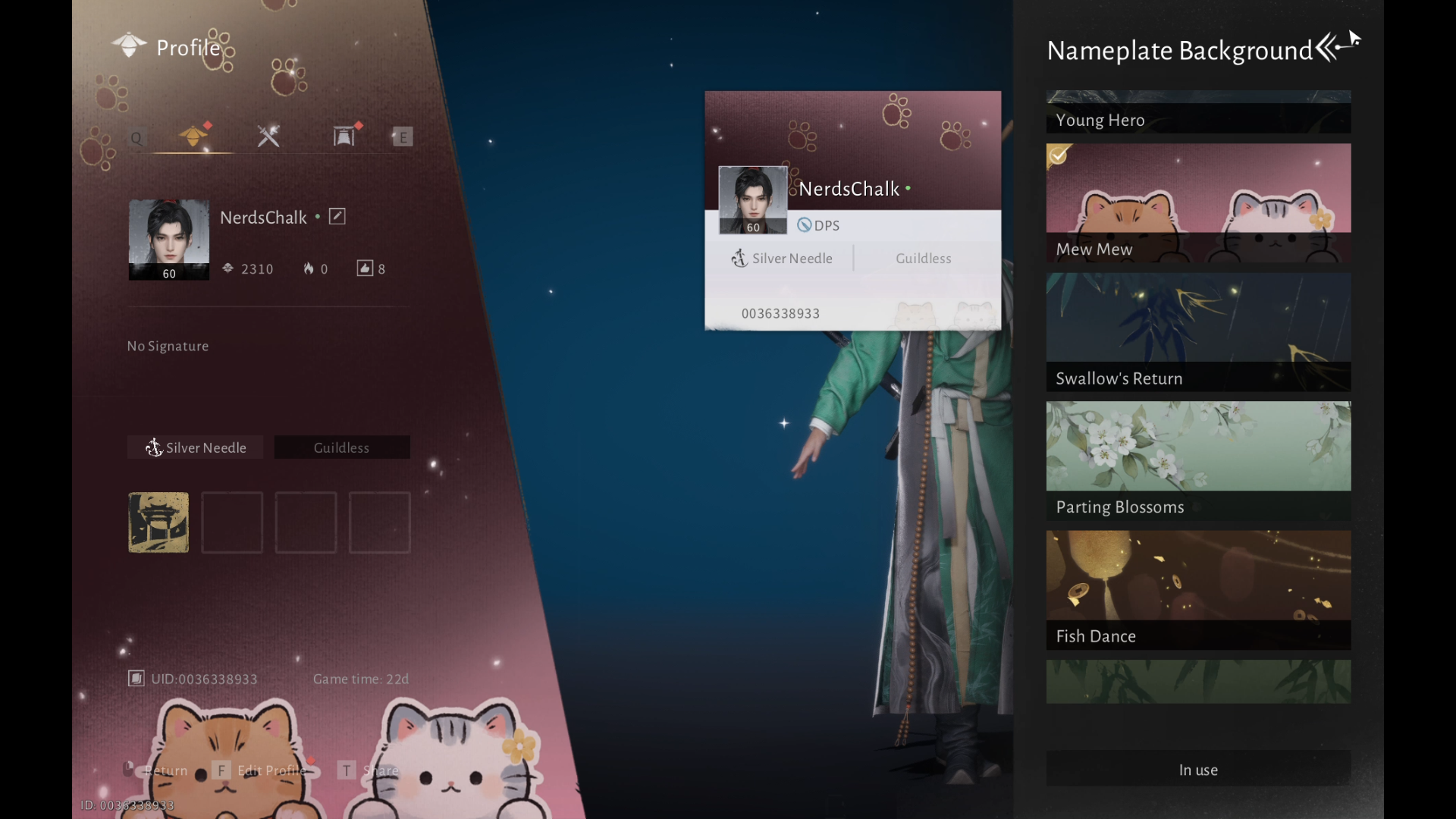
Learn how to obtain all 14 Nameplate Backgrounds as well as how to change it to spruce up your profile in Where Winds Meet.
In Where Winds Meet, the nameplate background is a cosmetic upgrade that you can make for your profile. There are a total of 14 nameplate backgrounds (including Default) that you can choose from. But not all of them are obtained the same way.
Here’s everything you need to know to unlock, acquire, and use Nameplate Backgrounds in Where Winds Meet.
How to change Nameplate Background
To change your Nameplate Background, first access it through your Profile.
Access the Profile from the Menu. Then select Edit Profile.

On the right, select Nameplate Background.

Here, you will find all the Nameplate Backgrounds that are available to you, as well as the ones that are unlocked.
To use a Nameplate Background, simply select it and click on Use at the bottom.

List of Nameplate Backgrounds in Where Winds Meet
Here’s a list of all 14 Nameplate Backgrounds in Where Winds Meet:
- Default

- Mew Mew – Exchange at Meow Meow Temple for 15 Meow Meow coins

- Swallow’s Return

- Parting Blossoms

- Fish Dance

- Bamboo Shadows – Engagement Reward

- Young Hero – Exchange at Wandering Paths Shop for 850 Adventure Slips

- A Promise Kept – Exchange at Draw – Essence of Heaven Shop for 100 Essence of Heaven.

- The Sound of Strings – Exchange at Earth Shop for 100 Essence of Earth

- Deep Longing – Exchange at Partnerships Shop for 1000 Harmony Charm (Purchase available at Partnership level 2)

- Life of Prosperity – Exchange at Red Gold Boutique

- Goose God – Limited-time Event Reward

- Blue-Green Landscape – Obtained from Premium Battle Pass

- Astral trail – Pre-Order Exclusive Pack

How to unlock Nameplate Backgrounds
You can unlock and obtain Nameplate Backgrounds in the following ways.
- Exchange at Partnership Shops, Red Gold Boutiques, or Draw – Essence of Earth Shop, Essence of Heaven Shop, Wandering Paths Shop,
- As Engagement Rewards
- Through in-game resources
- Via Pre-Order Exclusive Pack
- Via Premium Battle Pass
To unlock a particular Nameplate Background, simply select it and click on Obtain in the bottom right corner.

For instance, for Young Hero, you’ll need 850 Adventure Slips. If you have the required amount, simply click on Purchase.

Once obtained, simply select it and click Use to apply it.

How to get resources to unlock Nameplate Backgrounds
If you don’t have enough resources to purchase a particular Nameplate Background, you can check out how to obtain them through the purchase page itself.
Simply click on the resource required in the top right corner.

Once you have garnered enough resources, return to the page and click Purchase.
And that’s about it! Apart from the last two Nameplate Backgrounds (which are obtained from Premium Battle Pass or are part of the Pre-Order Exclusive Pack), you can get almost any Nameplate Background that you like for your profile through resource exchanges and events.




