


- What to know
- Crimson Desert Expanding the Camp details
- How camp expansion works in Crimson Desert
- How to start the quest through the dispatch NPC
- Gathering the required materials efficiently
- Assigning members and initiating the expansion
- Waiting out the construction timer and what it means
- Visual confirmation and quest completion
- Why this quest matters for your progression
What to know
- You must gather key materials before starting the expansion process
- The quest requires dispatching four members to Howling Hill
- A real-time wait of 1 day and 6 hours is required
- Completion unlocks visible camp upgrades and progression benefits
Expanding the Camp is one of the more strategic progression in Crimson Desert, shifting your focus from combat to resource management and camp development. If you are trying to grow your influence and unlock more features, this quest plays a crucial role in your journey.
Crimson Desert Expanding the Camp details
| Aspect | Details |
|---|---|
| Quest Name | Expanding the Camp |
| Location | Howling Hill |
| Quest Type | Faction / Camp Upgrade |
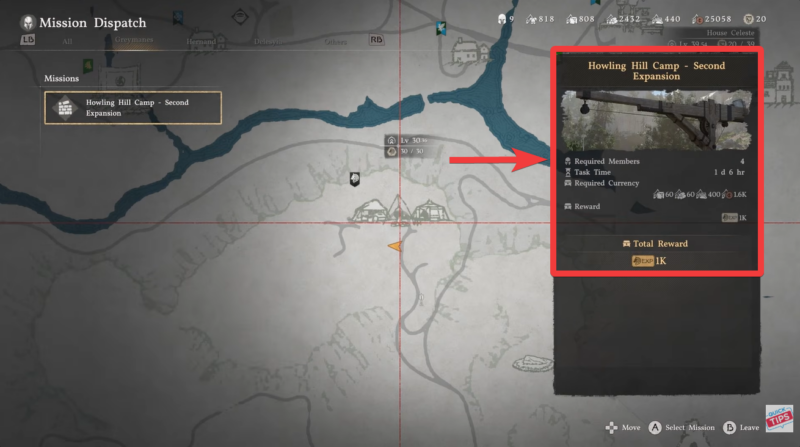
| Required Resources | 60 Stone, 60 Lumber, 400 Food, 1,600 Copper |
| Member Requirement | 4 Members |
| Completion Time | 1 Day 6 Hours (in-game time) |
| Main Objective | Expand the camp to increase capacity |
How camp expansion works in Crimson Desert
This quest introduces you to the camp management system, which becomes increasingly important as you progress. Instead of direct combat, you are required to prepare logistics, allocate resources, and manage your crew effectively.
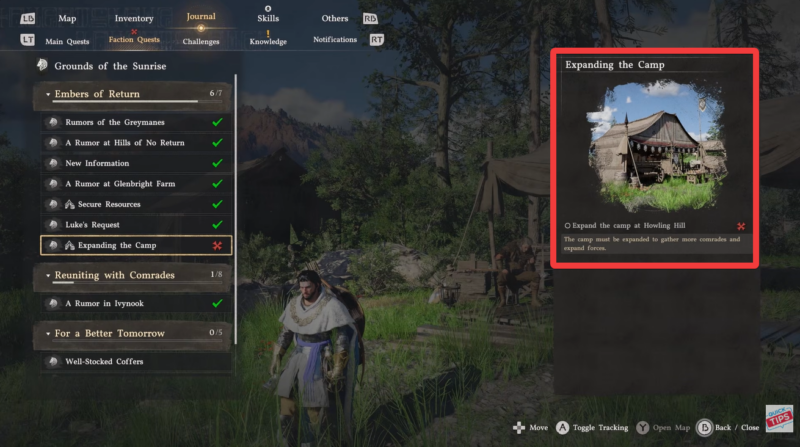
When you open your journal and track the quest, you will notice that the objective points you toward Howling Hill, where the expansion takes place. However, you cannot immediately complete it by simply traveling there. Preparation is the key requirement here, and that means gathering enough materials beforehand.
The system is designed in a way that rewards planning over speed, so rushing without resources will only delay your progress.
How to start the quest through the dispatch NPC
Step 1
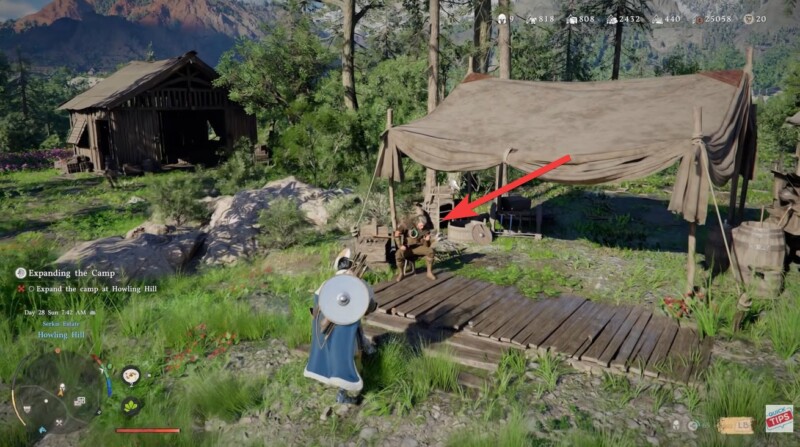
Locate the dispatch-related NPC Ross inside your camp. This character is responsible for managing assignments and expansion-related activities. You will usually find them near the central camp area where other management functions are handled.
Step 2
Interact with the NPC and select the camp expansion option. This triggers the requirement check and shows you what materials and members are needed.

Step 3
If you lack resources at this point, the system will not allow you to proceed, so make sure everything is ready before continuing.
Gathering the required materials efficiently
Before assigning members, you must collect the following:
| Resource | Amount | How to Get |
|---|---|---|
| Stone | 60 | Mining rocks in nearby regions |
| Lumber | 60 | Cutting trees or logging areas |
| Food | 400 | Hunting, farming, or purchasing |
| Copper | 1,600 | Looting, trading, or quest rewards |
You should prioritize farming routes that provide multiple resources simultaneously, especially areas where stone and lumber nodes are close together. Food is usually the most time-consuming, so planning ahead helps significantly.
Assigning members and initiating the expansion
Step 1
Once all materials are ready, return to the dispatch NPC Ross and open the expansion menu.

Step 2
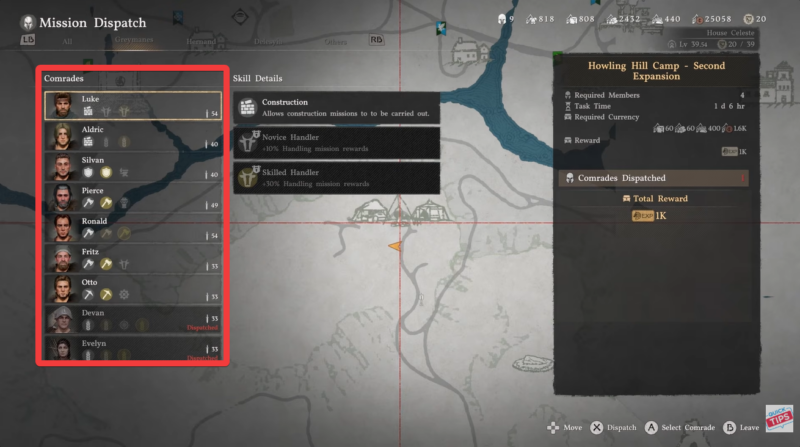
Select four available members from your roster. These can be companions or recruited allies depending on your progress.
Step 3
Assign them to the Howling Hill expansion task. The system will confirm the deployment and begin the process.
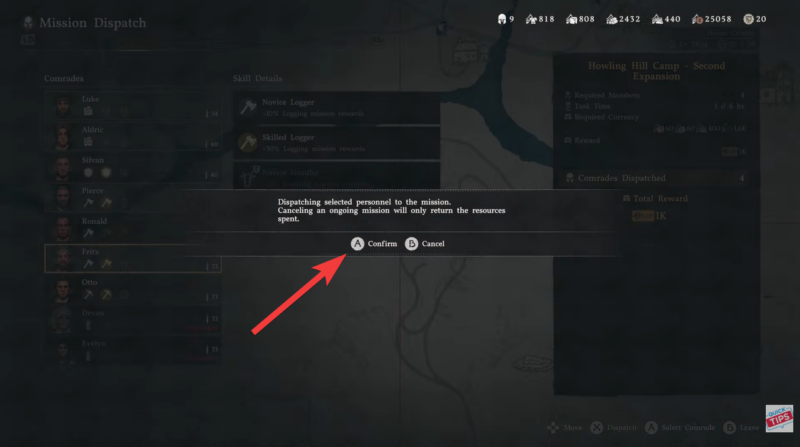
Step 4
After dispatching, the quest enters a timed phase, meaning you cannot speed it up through standard gameplay.
Waiting out the construction timer and what it means
The quest requires you to wait 1 day and 6 hours, which is a deliberate mechanic tied to realism and progression pacing. During this time, you are free to explore, complete other quests, or gather additional resources.
This waiting period is not wasted time. Instead, it encourages you to multitask and engage with other systems in the game.
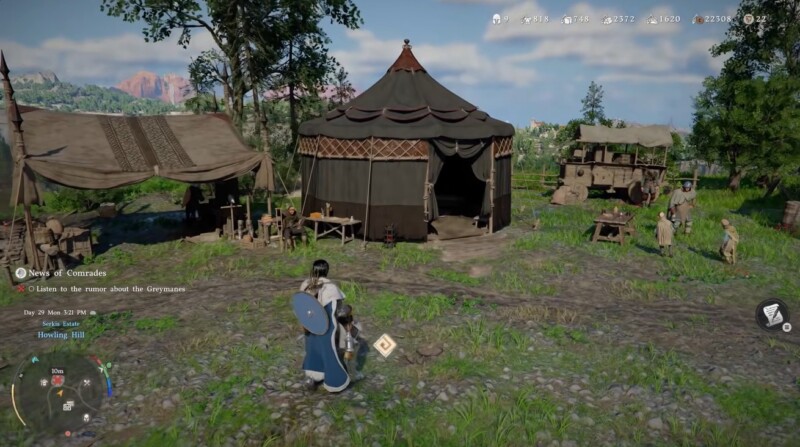
Once the timer finishes, the camp automatically upgrades.
Visual confirmation and quest completion
After the timer ends, you will notice new tents and structural improvements appearing in your camp. This is not just cosmetic. The expanded camp allows for more functionality, increased capacity, and future upgrades.
To finalize the quest, simply return to your camp area, trigger the completion by interacting with the system or NPC, and receive rewards, if any.
| Reward Type | Details |
|---|---|
| Camp Upgrade | Increased camp size and capacity |
| Progression Unlock | Enables future faction quests |
| Visual Changes | New tents and structures |
| Utility Boost | Better resource and member management |
While the rewards may seem indirect, they significantly impact your long-term gameplay, especially if you plan to invest in camp upgrades and faction progression.
Why this quest matters for your progression
Expanding the Camp is not just a side objective—it is a foundation for your growth in Crimson Desert. Without upgrading your camp, you may find yourself limited in terms of recruitment, storage, and future quest access.
It also teaches you how to balance exploration, resource farming, and time management, which becomes increasingly important in later stages of the game.
If you approach this quest with preparation and patience, it becomes one of the easiest yet most rewarding progression steps in the game. Focus on gathering resources early, keep your members available, and always plan around the waiting timer.
By the time your camp expands, you will not only complete the quest but also set yourself up for smoother progression ahead.



