What to know
- The Buck Capsule (A) simulation requires keeping all essential facilities running while limiting Electric Pylons placed.
- Buck Capsules rely on two inputs: bottles from Amethyst and powder from Buckflower processed through shredding and grinding.
- The key is completing missing belt segments, bypassing unnecessary machines, and then removing excess power usage once production stabilizes.
- The bonus goal is cleared by switching off redundant blue-end lines and removing an extra Pylon, without actually stopping the core production chain.
In Arknights: Endfield, Right after loading the Buck Capsule (A) simulation, the objective panel shows the conditions: keep all essential facilities operational, place no more than a set number of Electric Pylons, and complete the Buck Capsule (A) production before ending the run.
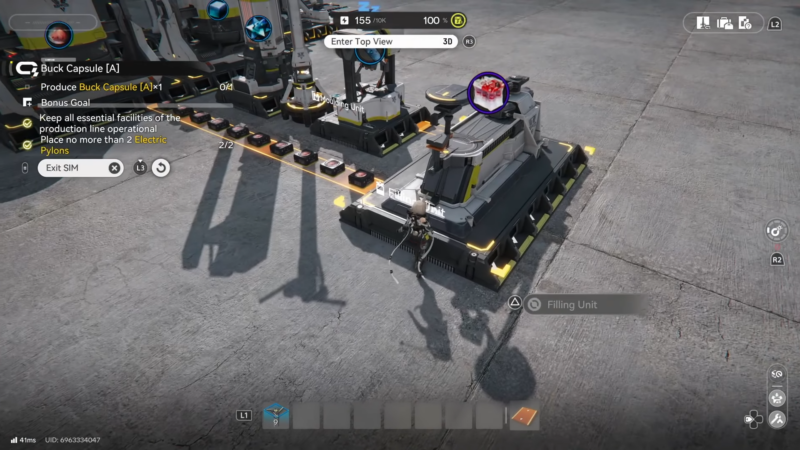
Buck Capsule (A) simulation overview
| Requirement | How it is satisfied |
|---|---|
| Keep all essential facilities operational | Ensure shredders, grinder, refinery, mold, filling remain powered |
| Produce Buck Capsule (A) | Connect powder and bottle lines into Filling Unit |
| Place no more than 2 Electric Pylons (bonus) | Start with up to 2 pylons, then disable extra pylon after ramp-up |
| Avoid unnecessary power draw | Disconnect one of the blue-end extra lines |
| Complete and end simulation | Wait for production counter to finish, then exit scenario |
Production chain elements
| Element | Role in chain | Input material | Output material |
|---|---|---|---|
| Shredding Unit | Turns plants into fine powder | Buckflower | Buckflower Powder |
| Grinding Unit | Further processes powders (where present) | Powder/plant product | Refined powder stream |
| Refining Unit | Refines Amethyst into fiber | Amethyst Ore | Amethyst Fiber |
| Molding Unit | Molds fiber into bottles | Amethyst Fiber | Empty Bottles |
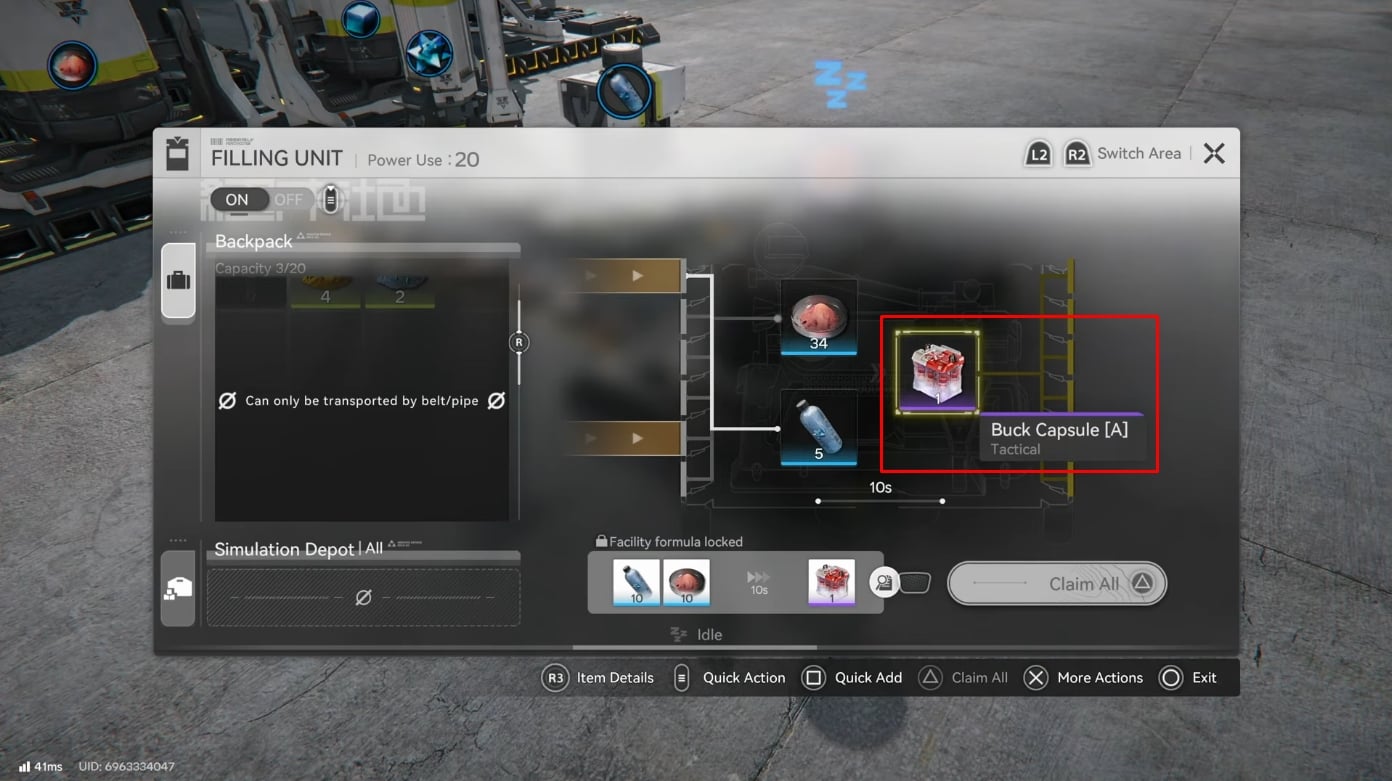
| Filling Unit | Combines bottle and powder into capsule | Bottle + Powder | Buck Capsule (A) |
| Electric Pylon | Powers nearby machines and belt segments | N/A | Power distribution |
Simulation requirements and layout overview
The Buck Capsule (A) factory layout in the simulation is partially built: Buckflower and Amethyst processing lines exist but some belt connections are missing, especially at the filling stage and on the far right where two belt segments are not linked. Essential facilities include the buckflower shredding and grinding units, the Amethyst refining and molding chain for bottles, and the final Filling Unit that combines both materials into Buck Capsules.
The mission also restricts Electric Pylons, so power routing matters: most machines sit within range of a central pylon position that can cover the shredding, grinding, and filling units at once. Non-essential side lines on the blue-colored side of the map draw power but do not contribute to the main capsule throughput, and these become the focus when meeting the bonus constraint.
Core resource flow for Buck Capsule (A)
Buck Capsule (A) needs two intermediate products: Buckflower Powder and empty Bottles.
- Buckflower line: Raw Buckflower → Shredding Unit → Buckflower Powder → Filling Unit input.
- Amethyst line: Amethyst Ore → Refining Unit (Fiber) → Molding Unit (Bottles) → Filling Unit input.
Once both inputs reach the Filling Unit, the facility starts producing Buck Capsules automatically as long as sufficient powder and bottles remain in the buffers.
How to connect the initial production belts
The first task in the simulation is to repair and complete the belt network so that all essential facilities are actually feeding the Filling Unit.
Step 1: Link plant machines to shredding units
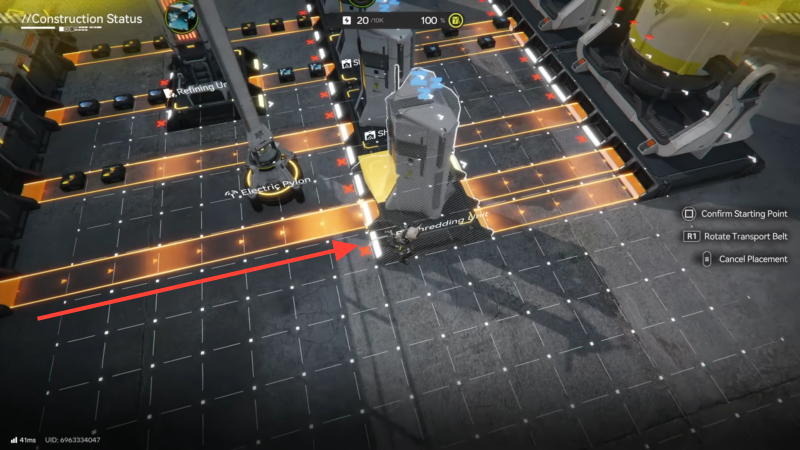
At the start, two plant or gathering machines that handle Buckflower sit near two shredding units but are not properly connected. A pair of belt lines must be placed:
- Connect the first plant machine’s output directly into the first shredding unit’s input.
- Connect the second plant machine’s output into the second shredding unit’s input on an adjacent belt line.
This establishes twin Buckflower input lines feeding powder production.
Step 2: Add missing belt between mid-line machines
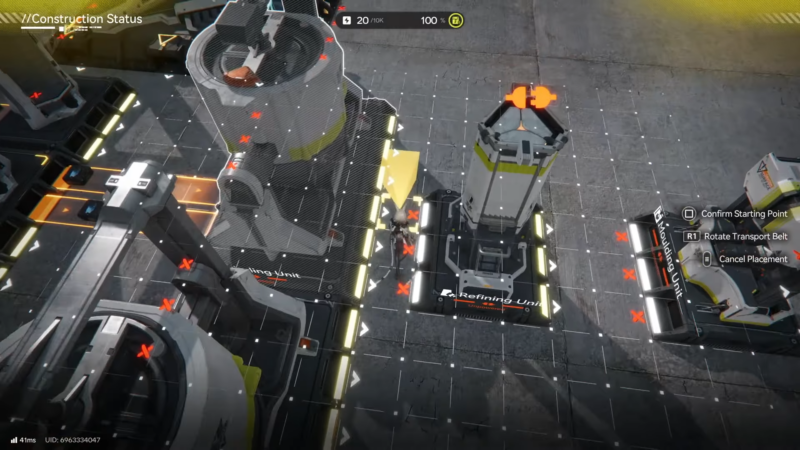
A gap exists between two mid-chain machines in the central area of the layout, breaking the flow toward the filling side. Place a belt segment that links those two machines so that processed materials continue moving toward the right-hand side of the map instead of stalling at the mid-point.
Step 3: Complete the right-side belt connection
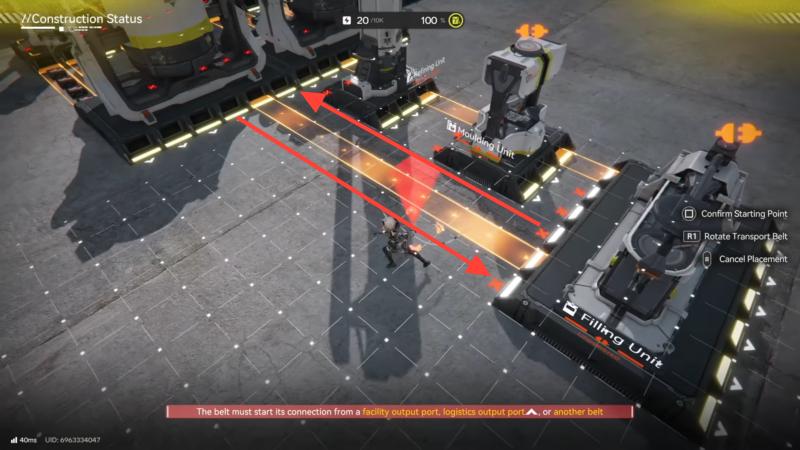
On the far right, two belt ends face each other without a linking segment. Place a short rail or belt piece to bridge these two ends, ensuring that materials coming from the shredding and grinding units can finally reach the Filling Unit.
Once these three connection steps are complete, Buckflower-based materials and Amethyst-derived products can travel along continuous belts, but the filling stage still needs a direct connection from grinding to filling.
How to route grinding output directly into the filling unit
The grinding unit on the opposite side of the layout has a partially pre-built belt path, but some of it loops through non-essential machinery before it reaches the filling area.
Step 4: Bypass extra machines and go straight to filling
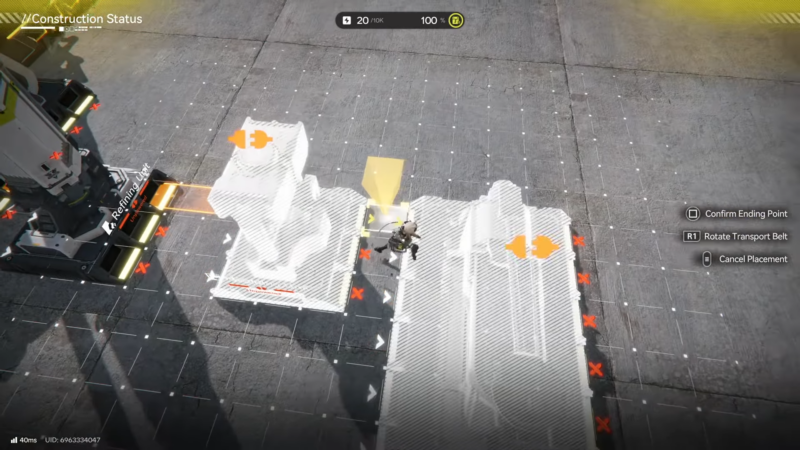
Locate the grinding unit that processes powder and find its current belt output. Remove or ignore belt branches that send product into unneeded side machines and instead build a straight belt line from the grinding unit output directly into the input port of the Filling Unit.
This bypass keeps the powder stream focused on Buck Capsule production, increasing throughput and simplifying the power requirement because fewer side machines need to stay active.
Step 5: Confirm bottle line to filling unit
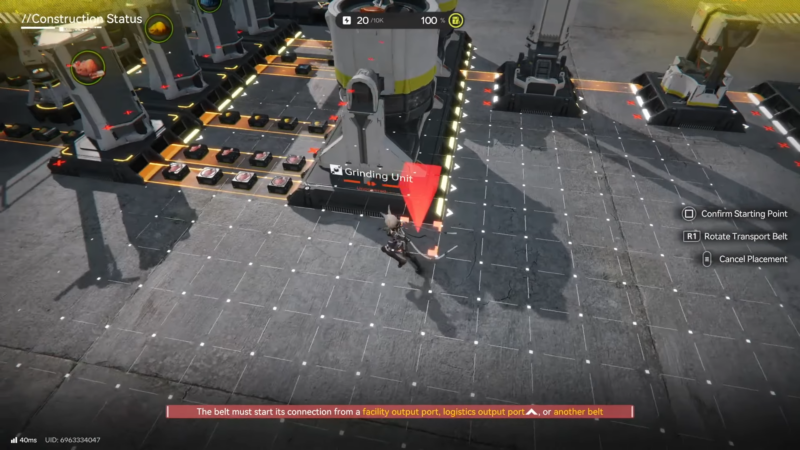
Check that the Amethyst refining and molding chain already has its belt linked to the second input of the Filling Unit. In the simulation layout, this link is usually present once the mid-right connections are made, but it is worth confirming that:
- Amethyst Fiber exits the Refining Unit and enters the Molding Unit.
- Bottles exit the Molding Unit and follow a belt directly into the Filling Unit input.
After this verification there should be two active input belts feeding the Filling Unit: one from the grinding unit’s powder line and one from the molding unit’s bottle line.
How to manage power and Electric Pylons
The mission objective includes a condition like “place no more than 2 Electric Pylons,” so power layout must be handled carefully to both start production and later fulfill the bonus goal.
Step 6: Place an initial central Electric Pylon
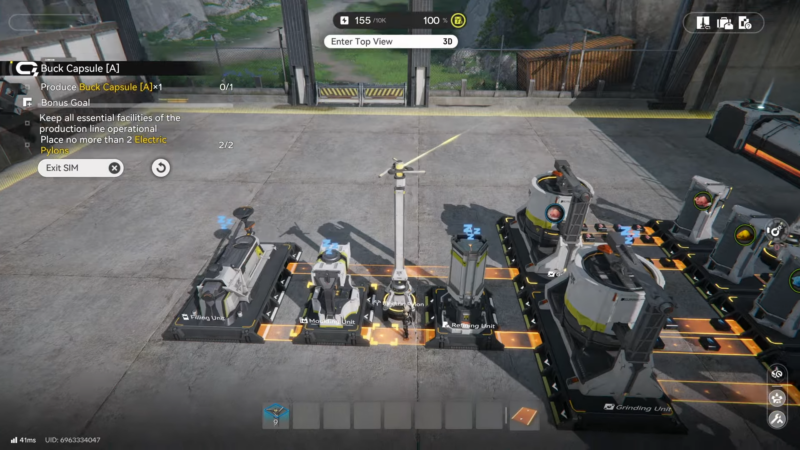
Early in the simulation, some key machines will be unpowered. Place one Electric Pylon in a central location that covers:
- The two shredding units.
- The grinding unit.
- The Filling Unit and adjacent belt segments.
This central placement ensures that the entire main production chain powers on and begins processing, even if a temporary second pylon is needed to cover stray machines at first.
Step 7: Use a temporary second pylon if needed
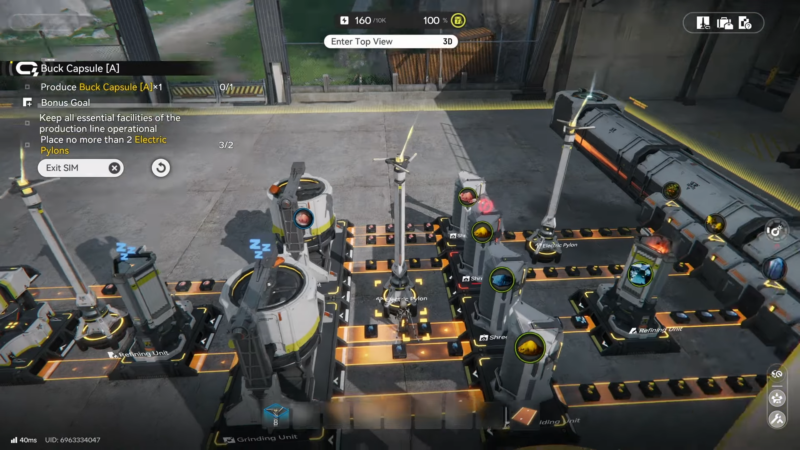
If any essential facility remains unpowered due to range limitations, a second Electric Pylon can be placed temporarily on the edge of the existing coverage. This allows every required machine to spin up and build internal buffers of powder and bottles; during this time, production ramps up and Buck Capsules start queuing at the Filling Unit’s output.
The bonus condition is not checked immediately, so exceeding the pylon limit temporarily is acceptable as long as the layout is adjusted before the simulation ends.
How to meet the bonus goal with fewer pylons
Once the chain is built and power tuned, attention can shift to trimming power draw and meeting the “no more than X pylons” bonus requirement.
Step 8: Identify and disable excess blue-end lines
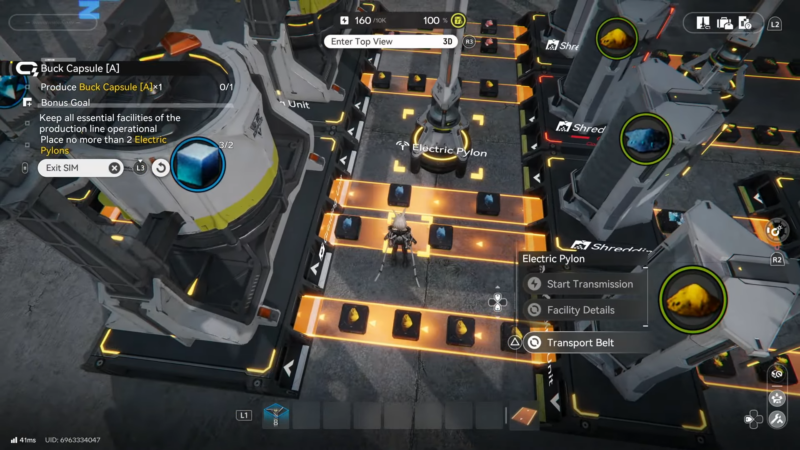
On the blue-colored end of the layout, there are two parallel belt lines that are not strictly required for the Buck Capsule (A) objective but still consume power through their machines and belts. One of these lines can be safely disconnected:
- Remove a short belt section or disconnect a junction so that one of the blue-end lines no longer receives materials.
- Leave the other blue-end line intact to preserve any minimal function needed in the simulation’s internal logic.
This cut reduces the number of active machines drawing from the electric network, which matters when one pylon is removed later.
Step 9: Remove the extra Electric Pylon
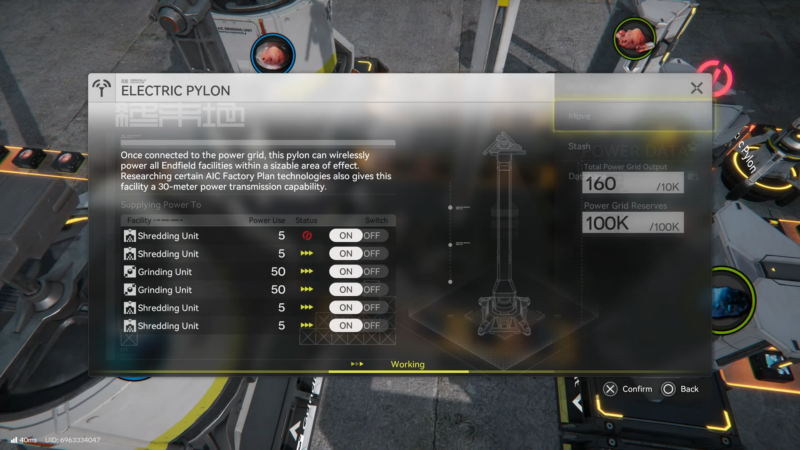
After confirming that capsules continue to move and that the critical shredding, grinding, molding, and filling units stay powered from the primary pylon, delete or disable the second Electric Pylon that was previously placed. The simulation interface may flag a machine as “unpowered” in the UI, but if the belts are still moving and the filling and upstream units remain operational, the game still counts the essential facilities as functioning for the objective.
At this stage, the bonus goal for staying within the Electric Pylon cap will register as complete, while the production line continues to output Buck Capsules until the target quantity or completion gate is reached.
Monitoring progress and finishing the simulation
Once the chain is built and power tuned, the only remaining requirement is to allow the processes to finish.
- The Filling Unit shows activity when both materials are present; its status indicator and belt animation confirm that Buck Capsules are in production.
- A red indicator on a machine no longer always signals a power failure; in this scenario it can also appear when a machine is backed up with output while waiting for downstream processing, which is normal near the end of production.
The objective tracker will mark both the main objective and the bonus goal as complete once enough Buck Capsules (A) are produced and the Electric Pylon condition is satisfied. At that point, the simulation can be ended from the interface, granting any associated rewards such as Stock Bills or scenario completion progress used to unlock further Endfield factory missions.
Rewards for completing Buck Capsule (A) simulation
| Reward type | Example amount | Purpose in game |
|---|---|---|
| Stock Bills | 200–400 | Trade currency for outpost upgrades and supplies |
| Factory XP / AIC XP | Scenario-based | Improves automation, unlocks further factory stages |
| Buck Capsule (A) | 1–5 units | Early-game healing or trade item for the outpost |
| Tech/Blueprint hint | Scenario flag | Progress toward more advanced Buck Capsule formulas |
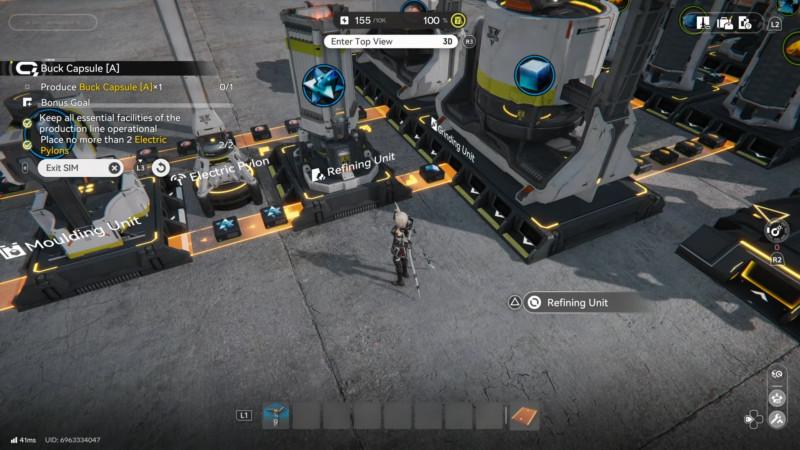
Buck Capsule (A) production
The Buck Capsule (A) simulation focuses on learning how to complete a partially built factory line while respecting tight power constraints and a pylon cap. Connecting every missing belt segment, routing grinding output straight into the Filling Unit, and then trimming non-essential power use allows consistent capsule production while fulfilling the bonus objective for limited Electric Pylons.
Thanks for following through, if you have aby doubts and questions do let us know!