Achieve perfect sniper accuracy in Battlefield 6 with optimal Range Finder attachment configurations and professional zeroing techniques.
What to know
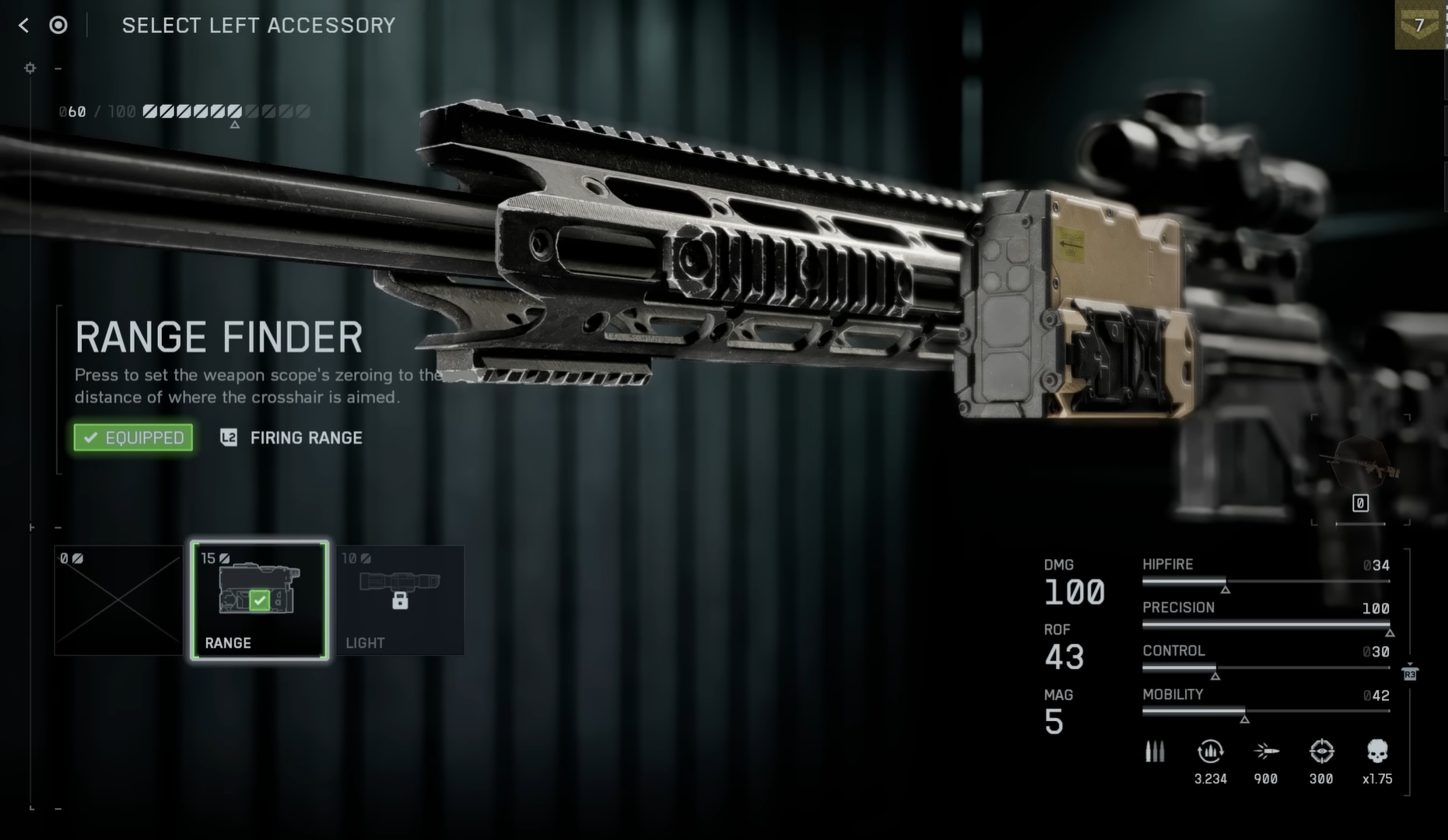
- The Range Finder is an exclusive attachment for sniper rifles, unlocked at Weapon Mastery Level 4 and requires 10 attachment points
- Hold B (PC) or D-pad Down (console) while aiming to automatically calibrate your scope to the exact target distance
- Rifles have a minimum zeroing distance of 100 meters, with all closer shots behaving as if fired at 100m range
- You can bind the Range Finder activation to your breath-hold key for seamless operation during sniping sequences
The Range Finder stands as one of Battlefield 6’s most crucial sniper attachments, transforming long-range engagements from guesswork into precision strikes. This sophisticated tool automatically adjusts your rifle’s zeroing distance, eliminating the traditional trial-and-error approach that plagued snipers in previous Battlefield titles.
How to unlock the Range Finder
The Range Finder becomes available exclusively for sniper rifles and designated marksman rifles once you achieve Weapon Mastery Level 4 with any semi-automatic rifle. This progression requires consistent weapon usage and challenge completion during matches. Consider using DMR rifles instead of pure sniper rifles initially, as they offer faster fire rates and easier handling while building toward the unlock threshold.
Once unlocked, navigate to your weapon customization menu and equip the Range Finder to the Right Accessory slot, which costs 10 attachment points. The attachment fits seamlessly into most sniper builds without compromising other essential modifications.
This Range Finder trick needs a patch.. it’s far too OP
by
u/Fearless_Ad_3644 in
Battlefield
How to use the Range Finder effectively
| Category | Details | Additional Notes |
|---|---|---|
| Attachment Unlock | Weapon Mastery Level 4 | Earned through consistent sniper rifle or DMR performance and precision kills. |
| Attachment Slot | Right Accessory (10 points) | Compatible with all sniper rifles and designated marksman rifles (DMRs). |
| Activation Key (Default PC) | Hold B | Can be remapped in Control Settings → Gadget Bindings. |
| Activation Key (Default Console) | Hold D-Pad Down | Performs the same function as PC input; shows distance overlay. |
| Suggested Rebind | Breath-Hold Key (Shift / Left Stick Click) | Improves flow for aim-adjust + fire timing during scoped shots. |
| Minimum Zero Distance | 100 meters | Zeroing cannot drop below this range for gameplay balance. |
| Maximum Zero Distance | 500 meters | Auto-calibrated when using the Range Finder HUD readout. |
| Primary Weapon Use | Sniper Rifles & DMRs | Optimized for M2010 ESR, SVK, and other long-range weapons. |
| Best Supporting Attachments | High-Velocity Rounds + Bipod | Improves bullet velocity and stability, minimizing drop and sway. |
| Best Maps for Usage | Operation Firestorm, Mirak Valley | Ideal for open-terrain engagements beyond 200 m. |
| Manual Alternative (No Range Finder) | Use Ping + Adjust Zeroing | Ping the target’s terrain to estimate range manually. |
| Common Issues | Attachment unresponsive in-match | Swap weapons or visit Firing Range to reset attachment state. |
| Optimal Usage Strategy | Re-range before each shot or elevation change | Maintains consistent hit accuracy across variable distances. |

Quick tricks for the Range Finder in Battlefield 6
- Hold the range finder button to auto-set your aim distance.
- Use it again if your target moves or is farther away.
- Set manual zeroing for common ranges like 300 m or 400 m.
- Only sniper rifles and DMRs can use the range finder.
- Don’t use it in close combat — it slows you down.
- It’s less useful on small maps with short sightlines.
- Press B on PC or Down on the D-pad (console) to use it.
Strategic applications for range finder
Large-scale maps like Operation Firestorm and Mirak Valley provide ideal environments for Range Finder usage, where engagements regularly exceed 200 meters.
The attachment proves particularly valuable for stationary target elimination, where precise calibration can guarantee first-shot kills.
Always re-range your rifle when targets move or when switching between different elevation levels, as distance changes can significantly impact bullet trajectory.
Make ranging a habitual part of your pre-shot routine to maintain consistent accuracy across all engagements.