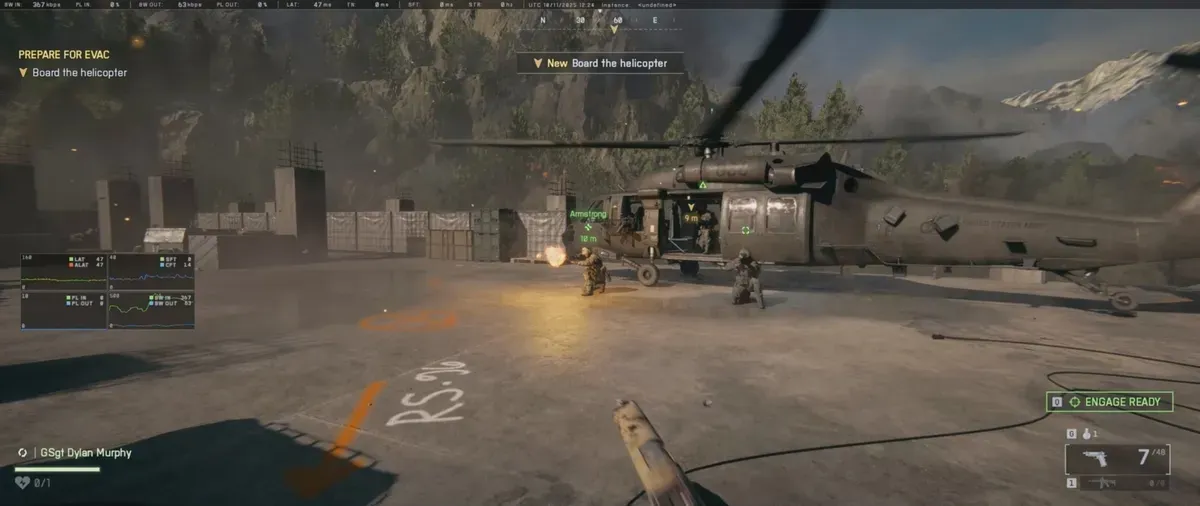
The top-left HUD in Battlefield 6 reveals crucial stats—understand each symbol to track your team’s progress and win the match.
What to know
- The box with text in the top left is often the VOIP (voice chat) status bar.
- Small icons (arrows or bars) may indicate latency, network health, or packet loss.
- Red or yellow symbols in the weapon or class UI are noticed by players but not yet officially explained.
- Some top-left messages are linked to internal status overlays or debugging tools.
When trying to interpret symbols in the top left of your screen in Battlefield 6, remember that the game is still under active development, and not all HUD elements have been officially documented yet.
Battlefield 6 Top-left Symbols
| Symbol | Color | Shape / Display | What It Means |
|---|---|---|---|
| Gauge Bar (Left Side) | Blue | Horizontal bar, lower-left or upper HUD section. | Indicates your team’s remaining reinforcements — decreases as allies are eliminated or tickets are spent. |
| Gauge Bar (Right Side) | Red | Horizontal bar, mirroring the left gauge. | Displays the enemy team’s remaining reinforcements — when it reaches zero, your team wins. |
| Flag Marker (Controlled) | Blue | Circular icon labeled with a letter (A, B, C, etc.). | Represents a team-controlled objective or flag zone on the battlefield. |
| Flag Marker (Enemy-Controlled) | Red | Diamond-shaped icon labeled with a letter. | Denotes enemy-held objectives that can be captured or contested. |
| Ticket Counter | Varies (Blue/Red) | Numeric display beside the reinforcement bars. | Shows current tickets or score for each team in objective-based modes. |
| Status / Warning Icon | Yellow or Red | Exclamation mark, alert triangle, or system message. | Appears during critical events, such as artillery strikes, vehicle spawns, or sector lockdowns. |
VOIP and chat status box
Many players report that a box appearing in the top left corner corresponds to the in-game VOIP or voice chat system. This indicator may appear when joining a server, activating a squad channel, or using proximity chat. It’s typically used to show whether the voice system is active or muted.
Connection and performance indicators
In previous Battlefield titles, small boxes or bars in HUD corners served as performance or network symbols—such as packet loss, latency spikes, or connection issues. The same logic applies to Battlefield 6. When you see yellow or red network icons, it likely signals momentary instability, high ping, or packet loss. These indicators are meant to help diagnose lag during online matches.
Red and yellow symbols in weapon or class interface
Within the weapon or loadout interface, some red or yellow icons have appeared next to certain weapons or attachments. These are still unofficially documented but may represent availability, rarity, or performance warnings. They do not seem to affect gameplay directly and are likely placeholders or early-build debugging symbols.
Why these HUD elements matter
Keeping your eye on these symbols helps you:
- Adapt strategy if your team is low on reinforcements or losing objectives.
- Focus pushes on points about to fall or defend vulnerable flags highlighted in the HUD.
- Understand your team’s status at a glance—vital for competitive and casual matches alike.
Learning the top-left HUD symbols in Battlefield 6 gives you an instant tactical overview every match. As you become familiar with each icon’s meaning, you’ll make smarter decisions, spot team progress, and contribute more effectively to victory.