Battlefield 6 redefines community mapping with the Portal SDK—customize game rules, assets, and play with friends for full XP.
What to know
- Battlefield 6 introduces robust custom mapping through Portal mode’s SDK and web-based tools, letting you create, edit, and share maps.
- The map editor is powered by the Godot engine and is accessible by downloading the Portal SDK after logging into your EA account.
- Custom maps earn XP like standard maps and can be hosted on community servers, with community creations already popular at launch.
- Asset customization is vast—terrain, buildings, spawn points, objects, and effects can be added, altered, and positioned in your design.
Jump into Battlefield 6 with more creative freedom than ever before, thanks to a new suite of custom map tools. Whether you’re reviving classic layouts, creating wild new experiences, or simply tweaking the gameplay to your taste, Portal mode gives you the power to shape the battleground.
Portal editor & creation suite in Battlefield 6
| Feature | Description [ Cited ] |
|---|---|
| Editor Tool | Built on the Portal SDK, leveraging a Godot-based framework for object placement, scripting, and environment editing. |
| Asset Types | Includes buildings, cover pieces, spawn points, interactive props, and other modular world assets used for map creation. |
| XP / Progression | Players can earn standard XP and progression while playing on eligible custom maps, depending on server configuration. |
| Testing / Sharing | Custom creations can be tested locally or uploaded publicly via the Server Browser, allowing others to join or bookmark. |
| Rule / Mode Editing | Adjustable through the web-based Builder and logic scripting tools, enabling designers to craft unique rulesets and custom modes. |
Quick Notes
- All Portal creations are playable across PC and consoles via shared server codes.
- Uploaded maps are screened for compliance before appearing in the Public Server Browser.
- Ideal for XP farms, competitive setups, cinematic scenarios, or mod-style creative events.
Battlefield 6 custom map creation explained
The standout feature of Battlefield 6’s community offerings is the Portal mode. It expands on previous customization by letting you create or alter maps, rules, and game modes using a mix of web tools and downloadable software. Portal mode’s SDK is based on the Godot engine, giving you professional-grade flexibility to design your own unique battle spaces.
Community members are already exporting classic Call of Duty maps, original designs, and even imaginative settings like space battlefields into custom Battlefield 6 experiences. These creations can be hosted as persistent servers where players can join, compete, and even earn normal progression rewards.
How to start building your own custom map in BF6
Creating a custom map in Battlefield 6 is accessible, but requires following certain steps and using the right tools. Here’s a guide to get you started:
Step 1: Access the Portal Builder
Go to the official Battlefield Portal experience website and log in with your EA account. Here, you’ll find options for rule editing and custom mode creation.

Step 2: Download the Portal SDK
Download the latest Portal SDK package (currently around 2.3 GB). This includes the Godot engine executable pre-configured for Battlefield 6 map editing.

Step 3: Set up the SDK Environment
- Extract the SDK folder.
- Launch the Godot executable inside the SDK.
- Load the Battlefield 6 Portal project file as prompted.

Step 4: Begin Map Editing
- Open the Scene menu, select “Open Scene,” and pick a map base to start from (all available maps are found under the ‘levels’ folder).
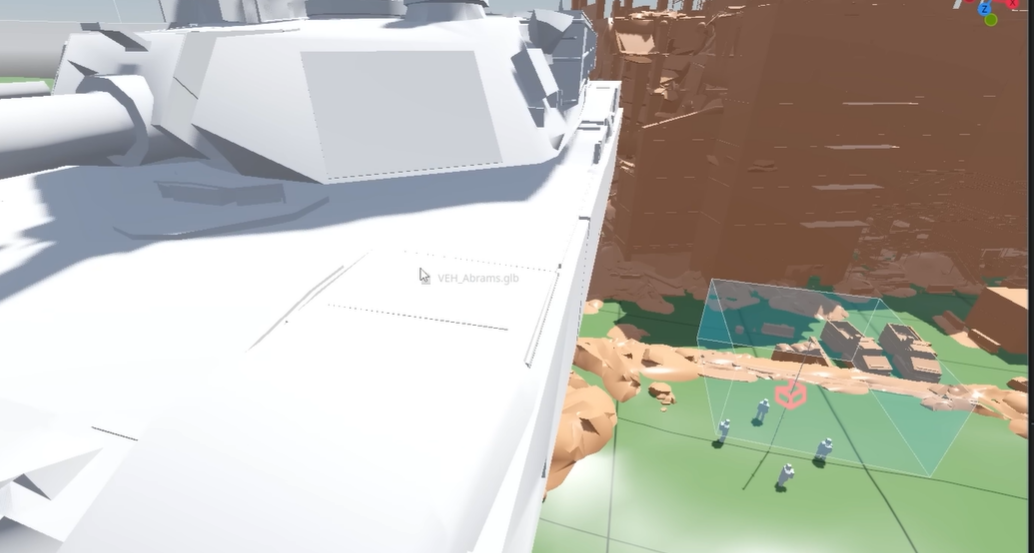
- Use the Object Library to drag, drop, and arrange assets like buildings, covers, roads, and decorative elements.
- Spawn points, objectives, and gameplay triggers can be set and adjusted from the left panel’s dedicated tools.

Step 5: Fine-tune Objects and Rules
- Select, move, rotate, or scale objects in the 3D space. Uniform scaling is currently supported; adjust from the Inspector window for precision.
- Place additional game-relevant elements (e.g., HQs, vehicles) as needed for your desired game mode.

Step 6: Test and Publish
- Save the map and use dedicated test sessions to try your design.
- Once happy, you can upload your map for others to enjoy and set up a custom server running your creation.

Key map editor features and limitations
- You can only modify or add to existing map frameworks; you can’t erase essential terrain or landmark buildings.
- Most objects can be freely added or removed, but some assets are locked to certain maps.
- Visual and sound effects can be layered for environmental flair.
- Balance spawn placements and sightlines to ensure fair gameplay—use community feedback for improvements.
How to join and host community maps
Playing custom content is as easy as browsing the community server tab in-game. Many of the most popular user-created maps already have active servers, from nostalgic fan creations to experimental game types. Hosts can also set XP rules, rotations, and required mods, making finding your ideal game simple and fast.
Battlefield 6’s Portal lets your creativity shine, whether you want to replicate a classic, invent wild new modes, or design battlefield playgrounds for friends and rivals alike. With powerful tools and active community support, it’s never been easier to leave your signature on the series.