


- What to know
- Arknights Endfield Final Prep Orders rewards at glance
- What are Final Prep Orders in Arknights Endfield
- Rewards included in Final Prep Orders
- How to claim Final Prep Orders rewards in Arknights Endfield
- Where to find claimed rewards in-game
- Common mistakes when claiming Final Prep Orders
- Can Final Prep Orders rewards be reclaimed?
- Why Final Prep Orders rewards matter early on
- Timing and availability considerations
- How Final Prep Orders fits into Endfield’s event structure
- Troubleshooting missing rewards
- Claiming Final Prep Orders the right way
What to know
- Final Prep Orders rewards are claimed through the official event website
- You must manually assign rewards to a specific server and character
- Rewards are delivered via in-game mail, not instantly added
- Incorrect server or character selection cannot be undone
Before launch and major updates, Arknights: Endfield often runs web-based events designed to give players a small but meaningful head start. One of the most important of these is the Final Prep Orders pre-draw event, besides the Pre-registration and Milestone rewards.
Unlike rewards earned directly inside the game, Final Prep Orders items must be claimed manually through the event website and then delivered to your in-game mailbox. Missing a step—or choosing the wrong character—can result in confusion or lost rewards, so it’s important to follow the process carefully.
This guide explains exactly how to claim Final Prep Orders, what rewards you receive, where to find them in-game, and what to double-check before confirming.
Arknights Endfield Final Prep Orders rewards at glance
| Aspect | Details |
|---|---|
| Event type | Pre-launch / pre-draw web event |
| Claim location | Official Endfield event website |
| Delivery method | In-game mail |
| Claim limit | One-time per eligible account |
| Key rewards | T-Creds, Protoprisms |
What are Final Prep Orders in Arknights Endfield
Final Prep Orders is a pre-draw reward event that allows players to earn and reserve resources before fully starting their journey in Endfield.
These rewards are not cosmetic-only bonuses. They include core progression materials, making them especially valuable during the early hours of gameplay when resources are limited.
Because the event is handled externally through a website, the claim process is separate from normal in-game systems, which is why many players look for clarification.
Rewards included in Final Prep Orders
While exact quantities may vary depending on participation and event structure, Final Prep Orders typically include:
| Reward | Purpose |
|---|---|
| T-Creds | Primary currency for upgrades and progression |
| Protoprisms | Used for draws, upgrades, or advanced systems |
| Event items | Limited bonuses tied to the pre-draw |
These rewards are designed to smooth early progression rather than overpower it, giving you flexibility without skipping core gameplay.
How to claim Final Prep Orders rewards in Arknights Endfield
Claiming your rewards is a multi-step process that starts outside the game and finishes inside it. Each step must be completed correctly.
Step 1: Visit the official Final Prep Orders website
Begin by opening the official Final Prep Orders event page for Arknights: Endfield.
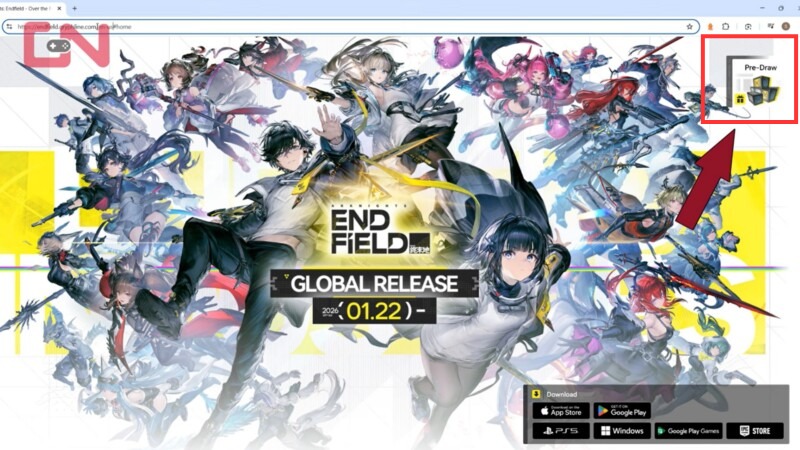
Make sure you are logged into the same account you use to play Endfield. If you are not logged in, the site will not be able to associate rewards with your game profile.
Step 2: Open the Backpack & Depot section
On the left side of the event page, locate and click the Backpack & Depot icon.
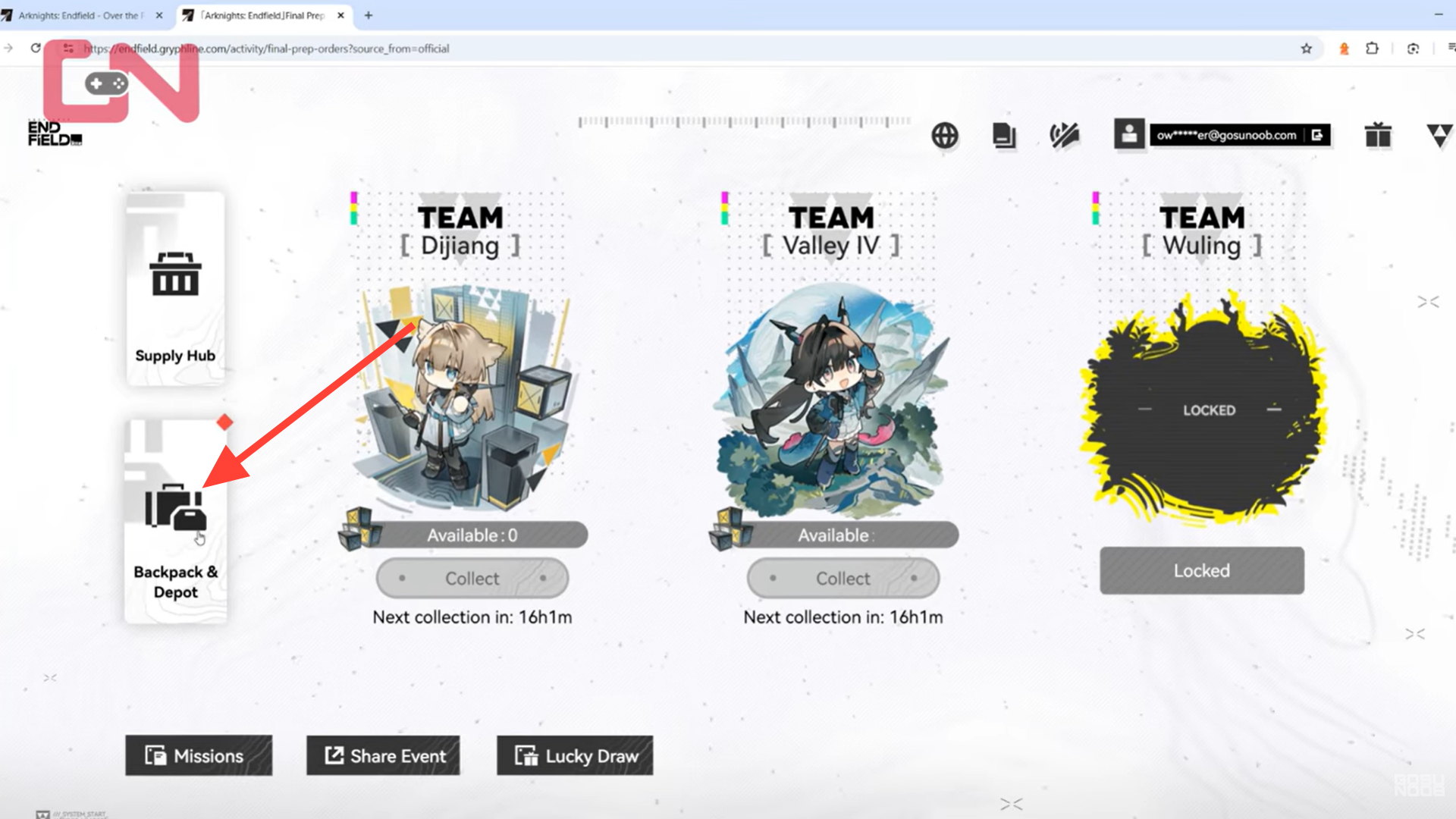
This section shows all items you have earned through the Final Prep Orders event. If you participated correctly, you should see rewards such as T-Creds and Protoprisms listed here.
Step 3: Select items and click Claim
Inside the Backpack tab, review the available rewards. To select the items, just click on the item and it is gonna direct them to your backpack.
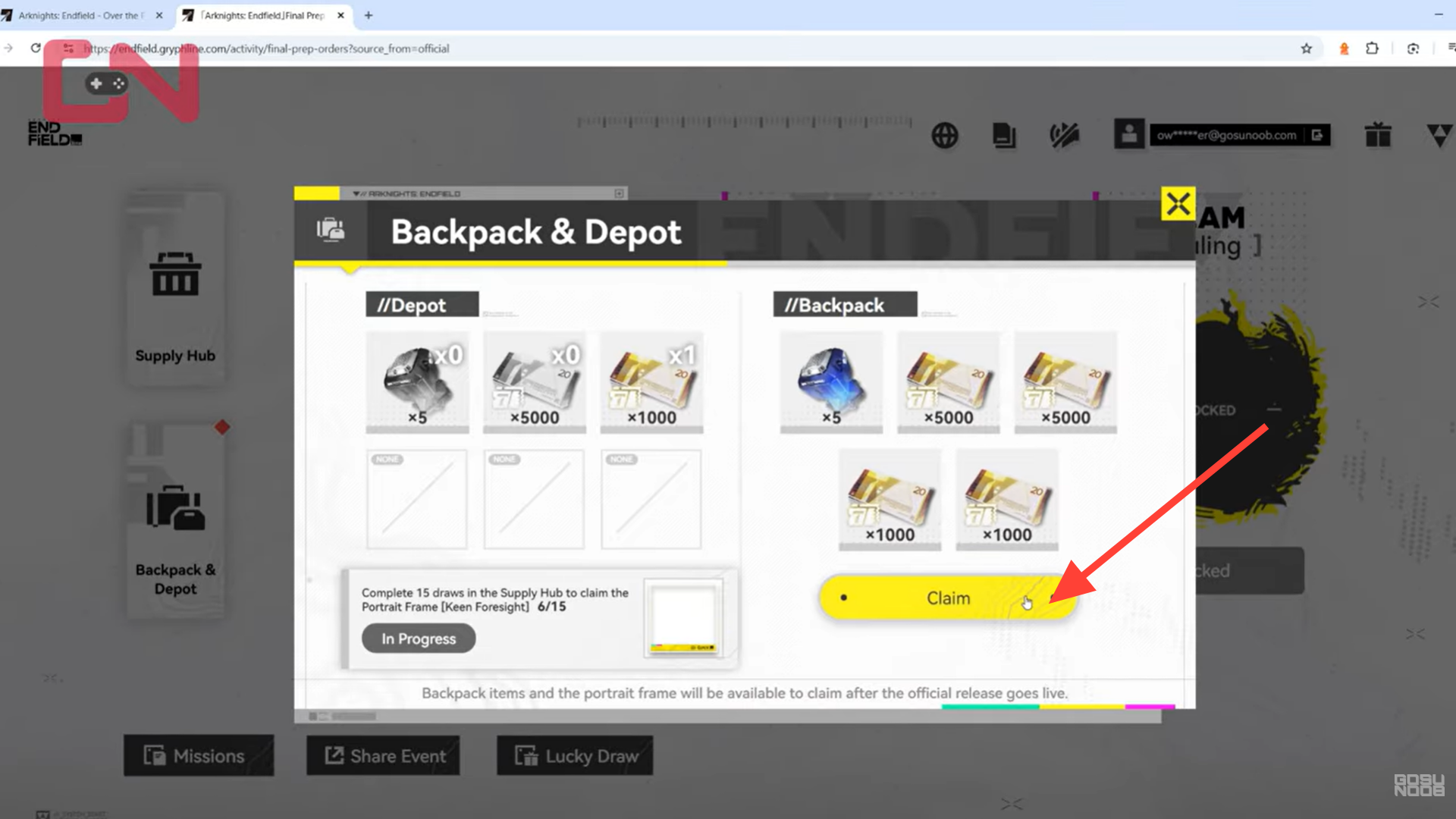
When you are ready, click Claim on the items you want to send to your game account. This action does not immediately deliver the items—it only starts the transfer process.
Step 4: Choose your server and character carefully
After clicking Claim, a pop-up window will appear.
Here, you must:
- Select the correct server
- Select the correct character
This step is critical. Rewards are sent only to the selected character, and incorrect selections usually cannot be reversed.
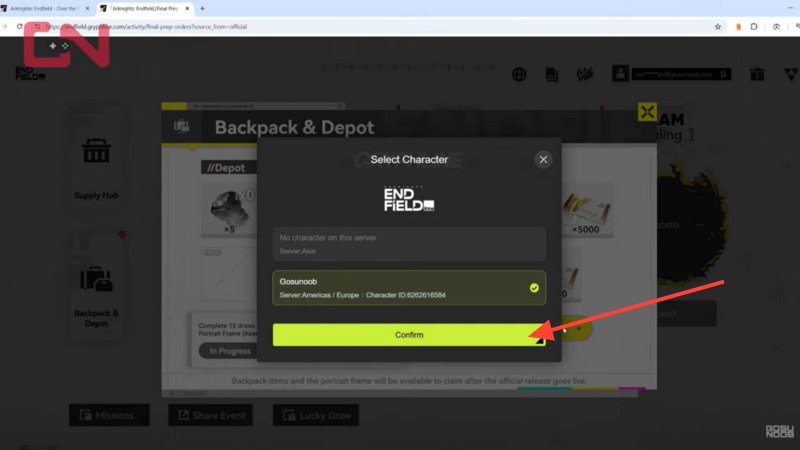
Take a moment to double-check everything before continuing.
Step 5: Confirm your selection
Once you are certain the server and character are correct, click Confirm.
You will be asked to confirm again. This second confirmation acts as a final safeguard against mistakes.
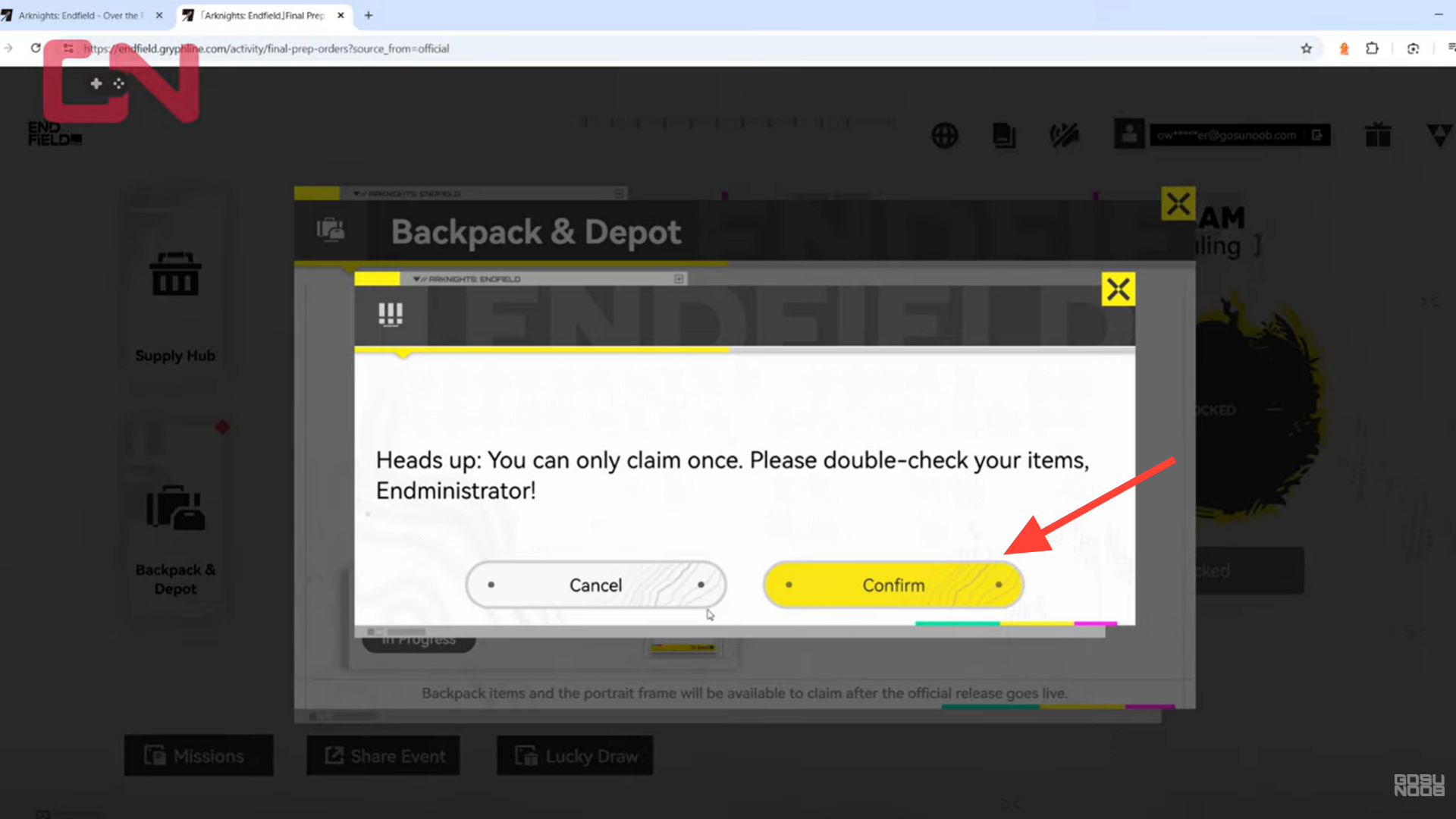
After confirming, the rewards are queued for delivery.
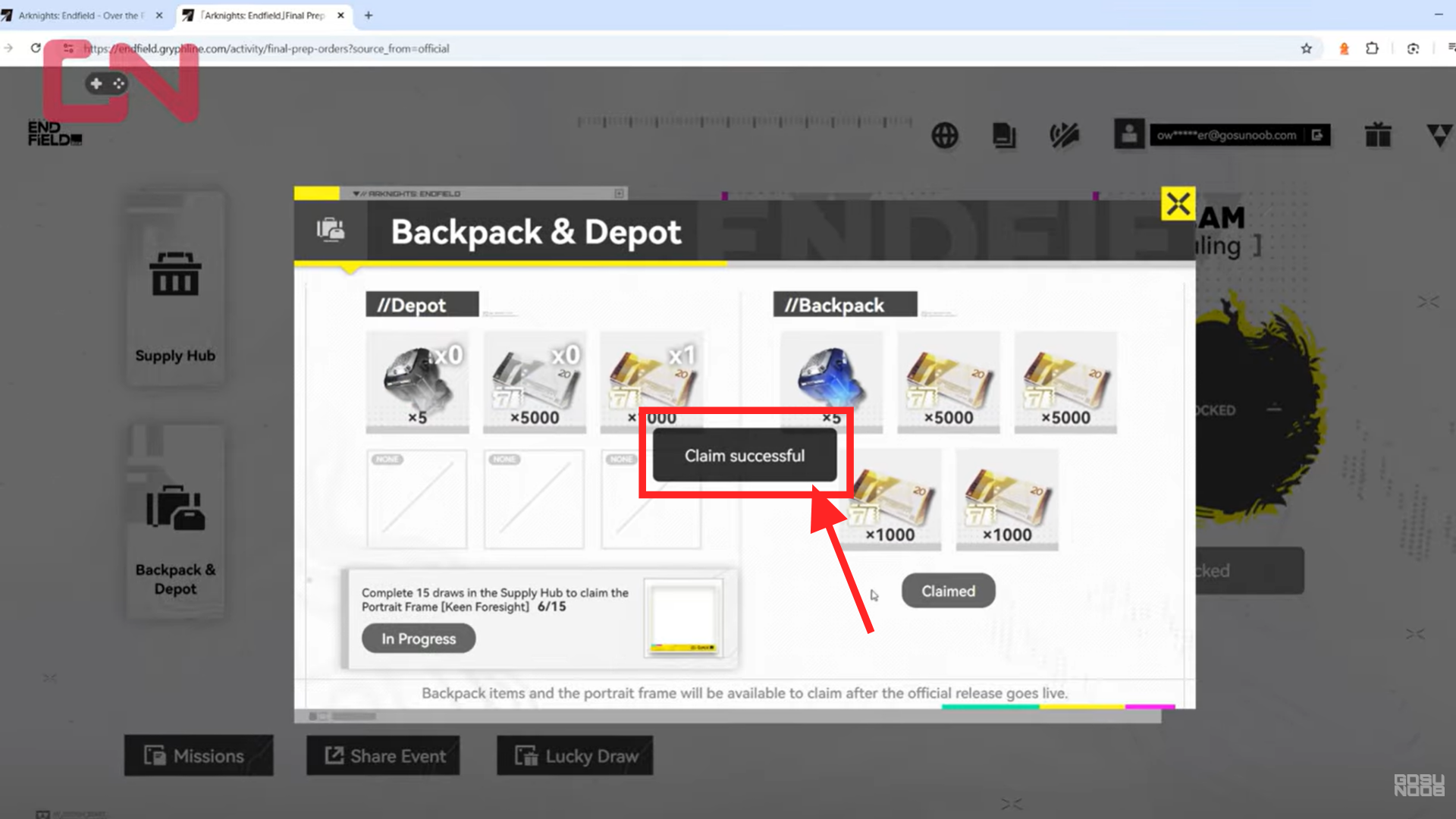
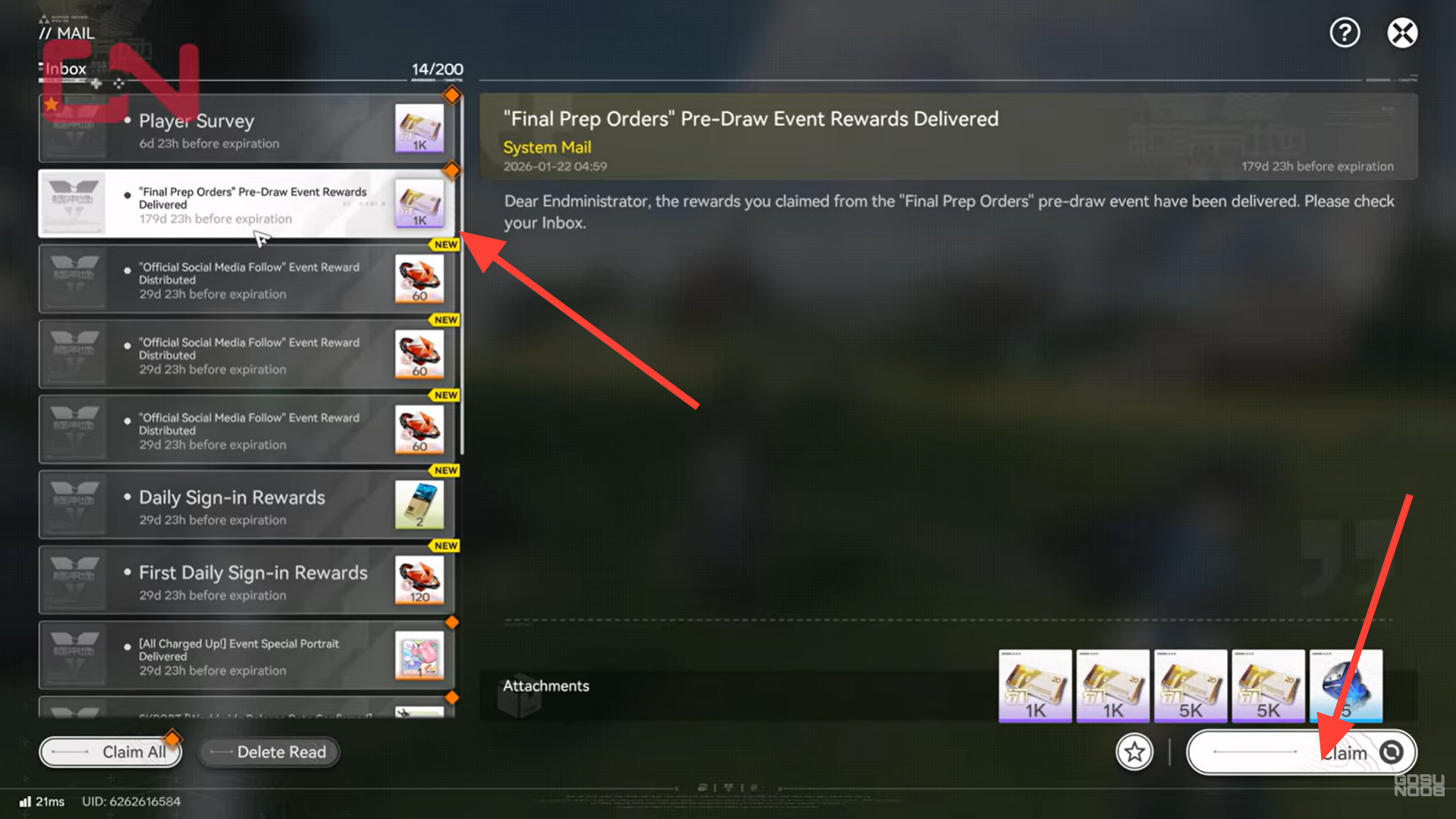
Step 6: Collect rewards from in-game mail
Launch Arknights: Endfield and log into the character you selected.
Open your in-game mailbox and look for a message titled:
“Final Prep Orders Pre-Draw Event Rewards Delivered”
Open the mail and click Claim to add the items to your inventory.
Where to find claimed rewards in-game
Once collected, rewards are added directly to their respective inventories.
- T-Creds appear in your currency total
- Protoprisms are added to your premium or special resource pool
There is no additional confirmation screen beyond the mail claim, so it’s a good idea to check your inventory afterward.
Common mistakes when claiming Final Prep Orders
Because the process spans both web and in-game systems, a few mistakes are common.
Selecting the wrong character
This is the most serious issue. Always verify the character name and server before confirming.
Forgetting to check in-game mail
Rewards are not auto-added. If you don’t open your mail and claim them, they will not appear in your inventory.
Assuming instant delivery
Delivery may take a short moment. If the mail does not appear immediately, try relogging or checking again later.
Can Final Prep Orders rewards be reclaimed?
Final Prep Orders rewards are generally one-time claims per account.
Once they are assigned to a character and delivered, they cannot be reclaimed, duplicated, or transferred. This is why careful confirmation is emphasized throughout the process.
Why Final Prep Orders rewards matter early on
Early-game Endfield progression can feel tight on resources. T-Creds and Protoprisms help by:
- Reducing early upgrade bottlenecks
- Allowing limited experimentation with systems
- Supporting smoother onboarding
They don’t remove challenge, but they do reduce unnecessary grind at the start.
Timing and availability considerations
Final Prep Orders events are usually time-limited. If the event period ends, unclaimed rewards may expire.
It’s recommended to:
- Claim rewards as soon as possible
- Verify delivery before long breaks
- Avoid waiting until the last day
How Final Prep Orders fits into Endfield’s event structure
Endfield’s event philosophy often blends in-game content with external participation. Final Prep Orders is an example of how the developers encourage early engagement without forcing it.
Participation is optional, but rewards are meaningful enough that skipping them puts you slightly behind in early progression efficiency.
Troubleshooting missing rewards
If you believe you completed all steps but don’t see your rewards:
- Confirm you logged into the correct character
- Recheck your in-game mailbox
- Ensure the claim was fully confirmed on the website
Most issues stem from skipped confirmation steps or incorrect character selection.
Claiming Final Prep Orders the right way
Claiming Final Prep Orders rewards in Arknights: Endfield is straightforward once you understand the flow: claim on the website, assign to the correct character, then collect through in-game mail.
By taking your time during the confirmation steps and verifying your selections, you ensure your early resources arrive safely and without issues. It’s a small process that pays off by making your first hours in Endfield smoother and more flexible.
We hope this Final Prep rewards claim guide for Arknights: Endfield offered all the clarity you were looking for and made your experience smoother. If you have any feedback, suggestions, or questions, drop them in the comments below. We actively read and respond, so feel free to reach out whenever you need extra help or guidance.




