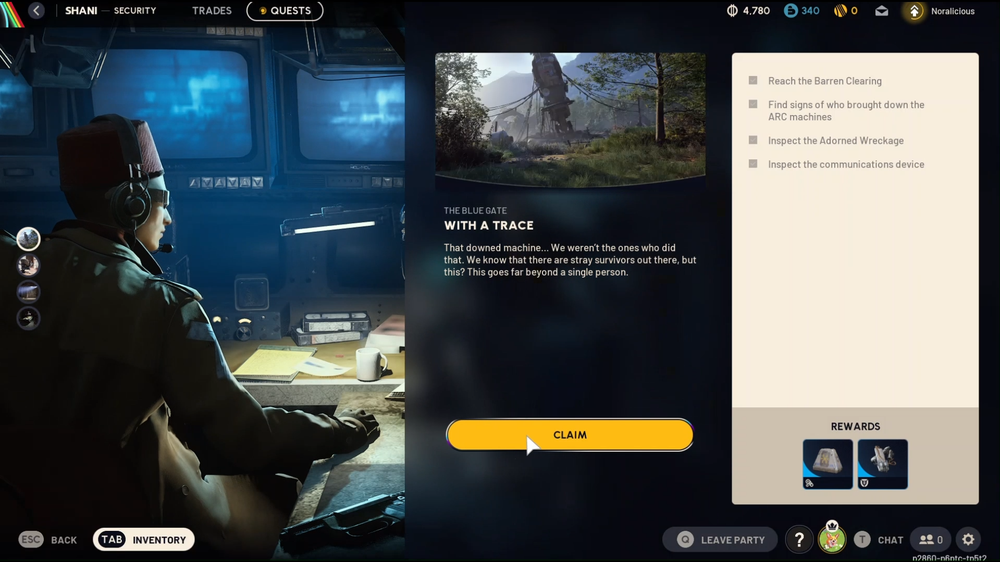
Learn how to complete the Adorned Wreckage inspection in Arc Raiders without missing the key interaction point.
What to know
- You’ll be doing this as part of the quest With a Trace in Arc Raiders.
- The Adorned Wreckage is located just southeast of another landmark called Barren Clearing.
- Despite the name, you don’t inspect the giant wreck itself — the real objective is to interact with a communications device nearby.
- The area is contested, with possible encounters against ARC machines or other players, so go prepared.
In Arc Raiders, the “Inspect the Adorned Wreckage” step appears during the With a Trace quest, which revolves around investigating who caused the ARC machine downing. Although it sounds simple, the actual inspection target can be confusing the first time you arrive. Below is a step-by-step explanation of how to locate and complete the objective without missing any details.
| Item | Description |
|---|---|
| Quest name | With a Trace |
| Objective location | Adorned Wreckage (southeast of Barren Clearing) |
| What to do | Inspect the communications device near the smaller wreck |
| Key challenge | Locating the correct device and handling enemy presence |
| Reward | Quest completion progress and experience |
“Inspect the Adorned Wreckage” Location
The Adorned Wreckage lies just beyond Barren Clearing, west of the Blue Gate region. Once you reach it, you’ll spot a large, decorated wreck that looks like a rocket — covered in graffiti and twisted metal. That’s a visual landmark, but not the objective itself.

Nearby, you’ll find a smaller wreck and a makeshift workstation with a yellow computer terminal. That’s where you need to interact to progress the quest. Be cautious, as this area frequently spawns hostile ARC units and other raiders completing the same step.
Inspect Adorned Wreckage objective – With a Trace Quest
Here is how you can complete Inspect Adorned Wreckage objective in Arc Raiders’ With a Trace quest:
Step 1
Head southeast toward the Adorned Wreckage. Follow your compass and look for the large rocket wreck with colorful markings.

Step 2
Ignore the huge wreck for now and focus on finding the smaller rocket-shaped wreck nearby. You’ll see a desk with a glowing yellow terminal beside it.

Step 3
Interact with that terminal. This counts as “Inspect the communications device,” completing the actual inspection requirement.

Once the inspection completes, your quest objective will update. You can extract safely or continue toward the next quest step as directed.
Rewards from With a Trace quest
| Reward | Description |
|---|---|
| Quest completion reward | Progress toward next quest stage |
| Experience gain | Boosts player level and progression |
| Loot chance | Random gear or materials depending on performance |
| Extraction bonus | Extra rewards for safe extraction after completion |
Note: Rewards may vary based on your player level and extraction success.
Tips for success
- Equip mid- to long-range weapons; enemies here often appear in open areas.
- Watch the radar for nearby raiders; it’s a frequent objective point.
- Approach from higher ground when possible for better visibility.
- Don’t waste time inspecting the main wreck — it’s the small terminal that counts.
- Once the interaction completes, extract promptly to avoid unnecessary fights.
Completing the Adorned Wreckage objective
The “Inspect the Adorned Wreckage” task in Arc Raiders may mislead you into focusing on the massive debris, but your real goal lies with the yellow terminal near the smaller wreck. Follow the correct path from Barren Clearing, keep your guard up, and interact with the right device to finish the With a Trace quest step efficiently.