

[rominfo]
STOCK FIRMWARE INFO
| Firmware Version | R950VXUBMK3 |
| Android Version | Android Jelly Bean 4.3 |
| Is this Official? | Yes! This is the official update by US Cellular. |
| Release Date | November 2013 |
| Credits | SamMobile |
[/rominfo]
WARNING!
Warranty may be void of your device if you follow the procedures given on this page.
You only are responsible for your device. We won’t be liable if any damage occurs to your device and/or its components.
US CELLULAR GALAXY NOTE 2 SCH-R950 OFFICIAL JELLY BEAN 4.3 FIRMWARE
Before you begin with guide instructions below, make sure your android device is adequately charged — at least 50% battery of the device.
STEP 0: CHECK DEVICE MODEL NO.
To make sure your device is eligible with this, you must first confirm its model no. in ‘About device’ option under Settings. Another way to confirm model no. is by looking for it on the packaging box of your device. It must be SCH-R950!
Do not use the procedures discussed here on any other Galaxy Note 2 (including the Galaxy Note 2 variant at Sprint, AT&T, Cricket, T-Mobile, Verizon and other International variants) or any other device of Samsung or any other company. You have been warned!
STEP 1: BACKUP YOUR DEVICE
Back up important data and stuff before you start playing around here as there are chances you might lose your apps and app-data (app settings, game progress, etc.), and in rare case, files on the internal memory, too.
For help on Backup and Restore, check out our exclusive page on that linked right below.
► ANDROID BACK UP AND RESTORE GUIDE: APPS AND TIPS
STEP 2: INSTALL LATEST DRIVER
You must have proper and working driver installed on your windows computer to be able to successfully flash stock firmware on your US Cellular Galaxy Note 2. In case you’re not sure, follow the link below for a definitive guide for installing driver for your Galaxy Note 2 on your computer.
► SAMSUNG GALAXY NOTE 2 DRIVERS INSTALLATION GUIDE
STEP 3: INSTALLATION INSTRUCTIONS
DOWNLOADS
Download the Odin zip file and firmware file given below. Transfer both Odin and firmware file to a separate folder on your computer just to keep things tidy.
ODIN ZIP FILE
DOWNLOAD LINK | File name: Latest Odin3 v3.09.zip (951 KB)
FIRMWARE ZIP FILE
DOWNLOAD LINK | MIRROR | File name: R950VXUBMK3_R950USCBMK3_USC.zip (1.0 GB)
STEP-BY-STEP GUIDE
Example video: If you haven’t used Odin before to install a stock firmware or anything else, then we suggest you first watch a video of that to get familiar with the process. The video demonstrates flashing of CWM Recovery on Galaxy S3, but since the procedure is same for flashing stock firmware also, the video will help: Click here to watch the video
Important Note: Backup important files stored on internal SD card of your device, so that in case a situation arises requiring you to do a factory reset after flashing stock firmware, which might format internal sd card too, your files will remain safe on PC.
- Extract/Unzip the Odin zip file, Latest Odin3 v3.09.zip on your computer (using 7-zip free software, preferably) to get this file: Odin3 v3.09.exe
- Extract/Unzip the Firmware zip file, R950VXUBMK3_R950USCBMK3_USC.zip on your computer (using 7-zip free software, preferably) to get this file: R950VXUBMK3_R950USCBMK3_HOME.tar.md5
- Move the firmware file, R950VXUBMK3_R950USCBMK3_HOME.tar.md5, in the same folder in which you extracted Latest Odin3 v3.09.zip (Just for your convenience, that is). So, now you’ll have the following files in that folder:
- Odin3 v3.09.exe
- R950VXUBMK3_R950USCBMK3_HOME.tar.md5
- Disconnect the Galaxy Note 2 from PC if it is connected.
- Double-click the Odin3 v3.09.exe file to open Odin.
- Boot your US Cellular Galaxy Note 2 into Download Mode:
- Power off your phone first and wait for 6-7 seconds after display is off
- Press and hold these 3 buttons together until you see Warning! screen: Volume Down + Power + Home
- Press Volume Up now to continue to Download Mode

- Connect your Galaxy Note 2 to PC. Odin window will show an Added!! message in bottom left box. Odin’s screen would look like this:

If you don’t get the Added! message, here are some troubleshooting tips:- Make sure you have installed driver for Galaxy Note 2 as said above.
- If you have already installed driver, then uninstall them and re-install back.
- Connect using a different USB port on your PC.
- Try a different USB cable. The original cable that came with your phone should work best, if not, try any other cable that’s new and of good quality.
- Reboot phone and PC and then try again.
- Load the firmware file (extracted in Step 2) into Odin as instructed below:
- Click on the AP button on Odin and select the R950VXUBMK3_R950USCBMK3_HOME.tar.md5 file (from step 2). Your Odin window should look something like the screenshot below:
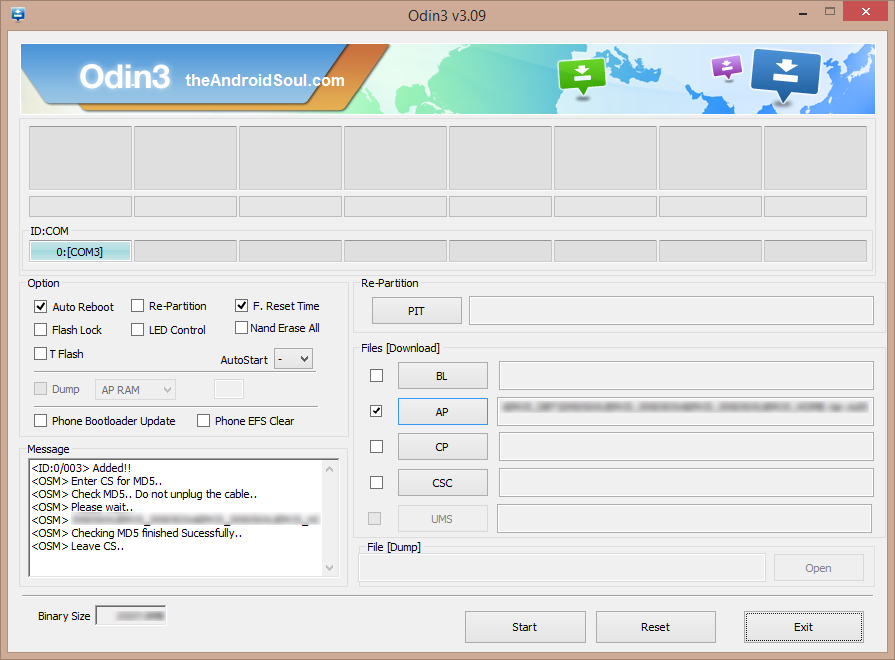
- Click on the AP button on Odin and select the R950VXUBMK3_R950USCBMK3_HOME.tar.md5 file (from step 2). Your Odin window should look something like the screenshot below:
- Now in the Option section of Odin, make sure that Re-Partition box is unchecked. (Auto Reboot and F. Reset Time boxes remain checked, while all other boxes remain unchecked.)
- Double check the above two steps.
- Click the Start button to begin flashing stock firmware on your US Cellular Galaxy Note 2 SCH-R950, and wait until you see a PASS! message in Odin’s top left box.
- When you get PASS! message, your phone will restart automatically. You can then disconnect your phone from PC.

If you see FAIL message instead of the PASS in Odin’s top left box, that’s a problem. Try this now: disconnect your Galaxy Note 2 from PC, close Odin, remove phone’s battery and put it back inside in 3-4 seconds, open Odin and then repeat from Step 6 of this guide again.
Also, If device is Stuck at setup connection or on any other process, then too, try this: disconnect your Note 2 from PC, close Odin, remove phone’s battery and put it back inside in 3-4 seconds, open Odin and then repeat from Step 6 of this guide again.
FEEDBACK US!
It was easy to flash stock Jelly Bean 4.3 firmware on your US Cellular Galaxy Note 2, right? Let us know in comments below.
Your suggestions and queries, if any, are most welcomed!




I have a brick bricked US Cellular Note 2. It would not boot and then
it crashed during a software (firmware) update. Now when I attempt to
download the factory using the odin 3.07 it fails with this info. I
thought this odin would be the trick. I cannot get to factory data reset
because it says to go to Kies and reselect recovery mode. Kies is
asking for a firmware recovery code which I do not have. I am presently
downloading 2 Kies updates that are supposed to be for this phone in
hopes that it will override the code issue and get to the get. How can I
get into this phone besides the volume up/power.home which gives me the
error Firmware upgrade encountered an issue. Please select recovery
mode in Kies 7 try again which asks for the unknown code or volume
down/power and home which is failing every time in odin 3.09 and 3.07.
Is there a master code that would get this phone over the hump with
Kies? It has never been started to the point that I could get the
phone’s USB set to MTP 🙁 I am a newby but not completely new to phones
and…
Added!!
Enter CS for MD5..
Check MD5.. Do not
unplug the cable..
Please wait..
R950VXUBMK3_R950USCBMK3_HOME.tar.md5 is valid.
Checking MD5
finished Sucessfully..
Leave CS..
Odin v.3
engine (ID:8)..
File
analysis..
SetupConnection..
Initialzation..
Get PIT for
mapping..
Firmware
update start..
SingleDownload.
sboot.bin
NAND Write
Start!!
FAIL!
Complete(Write) operation failed.
All threads
completed. (succeed 0 / failed 1)
Try the procedure given here: http://forum.xda-developers.com/showthread.php?t=2261153 and do let me know if it works
I have a brick bricked US Cellular Note 2. It would not boot and then
it crashed during a software (firmware) update. Now when I attempt to
download the factory using the odin 3.07 it fails with this info. I
thought this odin would be the trick. I cannot get to factory data reset
because it says to go to Kies and reselect recovery mode. Kies is
asking for a firmware recovery code which I do not have. I am presently
downloading 2 Kies updates that are supposed to be for this phone in
hopes that it will override the code issue and get to the get. How can I
get into this phone besides the volume up/power.home which gives me the
error Firmware upgrade encountered an issue. Please select recovery
mode in Kies 7 try again which asks for the unknown code or volume
down/power and home which is failing every time in odin 3.09 and 3.07.
Is there a master code that would get this phone over the hump with
Kies? It has never been started to the point that I could get the
phone’s USB set to MTP 🙁 I am a newby but not completely new to phones
and…
Added!!
Enter CS for MD5..
Check MD5.. Do not
unplug the cable..
Please wait..
R950VXUBMK3_R950USCBMK3_HOME.tar.md5 is valid.
Checking MD5
finished Sucessfully..
Leave CS..
Odin v.3
engine (ID:8)..
File
analysis..
SetupConnection..
Initialzation..
Get PIT for
mapping..
Firmware
update start..
SingleDownload.
sboot.bin
NAND Write
Start!!
FAIL!
Complete(Write) operation failed.
All threads
completed. (succeed 0 / failed 1)
Try the procedure given here: http://forum.xda-developers.com/showthread.php?t=2261153 and do let me know if it works
I have a brick bricked US Cellular Note 2. It would not boot and then
it crashed during a software (firmware) update. Now when I attempt to
download the factory using the odin 3.07 it fails with this info. I
thought this odin would be the trick. I cannot get to factory data reset
because it says to go to Kies and reselect recovery mode. Kies is
asking for a firmware recovery code which I do not have. I am presently
downloading 2 Kies updates that are supposed to be for this phone in
hopes that it will override the code issue and get to the get. How can I
get into this phone besides the volume up/power.home which gives me the
error Firmware upgrade encountered an issue. Please select recovery
mode in Kies 7 try again which asks for the unknown code or volume
down/power and home which is failing every time in odin 3.09 and 3.07.
Is there a master code that would get this phone over the hump with
Kies? It has never been started to the point that I could get the
phone’s USB set to MTP 🙁 I am a newby but not completely new to phones
and…
Added!!
Enter CS for MD5..
Check MD5.. Do not
unplug the cable..
Please wait..
R950VXUBMK3_R950USCBMK3_HOME.tar.md5 is valid.
Checking MD5
finished Sucessfully..
Leave CS..
Odin v.3
engine (ID:8)..
File
analysis..
SetupConnection..
Initialzation..
Get PIT for
mapping..
Firmware
update start..
SingleDownload.
sboot.bin
NAND Write
Start!!
FAIL!
Complete(Write) operation failed.
All threads
completed. (succeed 0 / failed 1)
Try the procedure given here: http://forum.xda-developers.com/showthread.php?t=2261153 and do let me know if it works
To be clear, this phone was presented to me bricked and so I started attempting to find the stock rom. That is a fiasco of people who are wanting paid 25 to give you the rom in less than 6 to 8 hours.
I was able to get the phone to let me do the volume up/power and home and volume down and power to get to download mode by installing the CF-Auto-Root-t0lteusc-t0lteusc-schr950.zip via odin 3.07. It would also boot to the first screen but no further. Kies was of no help whatsoever. It did not connect to the device because I was not able to set the phone’s USB to MTP as I shared earlier.
Now I was able to attempt installs from sd but those failed due to signature errors. After 8 hours I finally received the last of the 30 downloads that I had found to attempt to get the phone back from the brink. I tried the same 2 roms that I had tried via the sd card with the odin 3.07. Finally I tried the R950VXUCNE2_R950USCCNE2_USC.zip via the odin and it went all the way through and the phone is at 4.4.2 and happy as a lark. I was holding my breath the whole 4 or 5 minutes it took to write the information into the phone after arguing with it for over 8 hours with limited success at best. I did like the Unified_Android_Toolkit_v1.2.8 but it was unable to help me because I was not able to get the Phone to MTP. It may have been able to get me past the hump had I paid for the pro version which had the option of setting the phone to MTP somehow.
To be clear, this phone was presented to me bricked and so I started attempting to find the stock rom. That is a fiasco of people who are wanting paid 25 to give you the rom in less than 6 to 8 hours.
I was able to get the phone to let me do the volume up/power and home and volume down and power to get to download mode by installing the CF-Auto-Root-t0lteusc-t0lteusc-schr950.zip via odin 3.07. It would also boot to the first screen but no further. Kies was of no help whatsoever. It did not connect to the device because I was not able to set the phone’s USB to MTP as I shared earlier.
Now I was able to attempt installs from sd but those failed due to signature errors. After 8 hours I finally received the last of the 30 downloads that I had found to attempt to get the phone back from the brink. I tried the same 2 roms that I had tried via the sd card with the odin 3.07. Finally I tried the R950VXUCNE2_R950USCCNE2_USC.zip via the odin and it went all the way through and the phone is at 4.4.2 and happy as a lark. I was holding my breath the whole 4 or 5 minutes it took to write the information into the phone after arguing with it for over 8 hours with limited success at best. I did like the Unified_Android_Toolkit_v1.2.8 but it was unable to help me because I was not able to get the Phone to MTP. It may have been able to get me past the hump had I paid for the pro version which had the option of setting the phone to MTP somehow.
To be clear, this phone was presented to me bricked and so I started attempting to find the stock rom. That is a fiasco of people who are wanting paid 25 to give you the rom in less than 6 to 8 hours.
I was able to get the phone to let me do the volume up/power and home and volume down and power to get to download mode by installing the CF-Auto-Root-t0lteusc-t0lteusc-schr950.zip via odin 3.07. It would also boot to the first screen but no further. Kies was of no help whatsoever. It did not connect to the device because I was not able to set the phone’s USB to MTP as I shared earlier.
Now I was able to attempt installs from sd but those failed due to signature errors. After 8 hours I finally received the last of the 30 downloads that I had found to attempt to get the phone back from the brink. I tried the same 2 roms that I had tried via the sd card with the odin 3.07. Finally I tried the R950VXUCNE2_R950USCCNE2_USC.zip via the odin and it went all the way through and the phone is at 4.4.2 and happy as a lark. I was holding my breath the whole 4 or 5 minutes it took to write the information into the phone after arguing with it for over 8 hours with limited success at best. I did like the Unified_Android_Toolkit_v1.2.8 but it was unable to help me because I was not able to get the Phone to MTP. It may have been able to get me past the hump had I paid for the pro version which had the option of setting the phone to MTP somehow.