What to know
- Adobe Firefly adds Quick Cut, an AI feature that auto-edits raw footage into a structured first video draft.
- The update expands Firefly beyond image generation to include video editing and AI content workflows.
- Firefly can generate and sequence clips based on natural-language prompts and customizable settings.
- The update reflects Adobe’s push to make AI part of everyday creative work for storytellers, marketers, and creators.
You might already know Adobe Firefly as a generative AI platform that turns text prompts into images and creative assets. Today’s update, however, turns it into something much broader — a creative AI studio that helps you start, shape, and assemble content across image, video, and audio workflows.

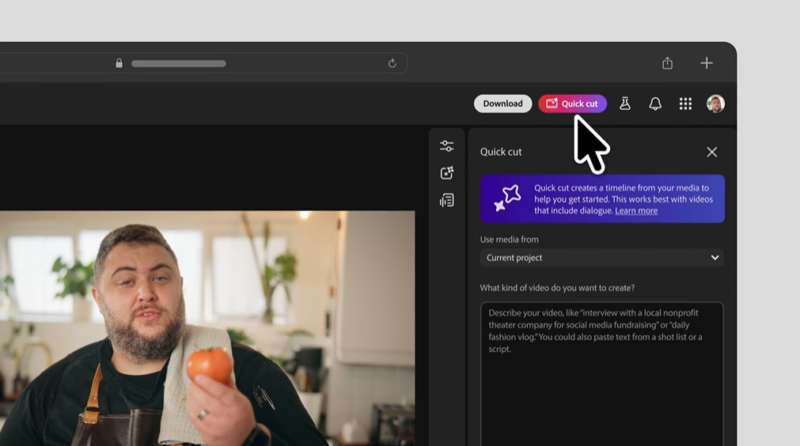
At the centre of this latest release is a new tool called Quick Cut. Built into the Firefly video editor, Quick Cut uses artificial intelligence to automatically assemble a first edit from your uploaded video clips and B-roll. Instead of importing footage and dragging clips onto a timeline one by one, you can describe what you want in plain language — for example, “create a product review video” or “assemble an interview with highlights” — and Firefly’s AI will select key moments, sequence them, and produce a structured first draft of your video for further refinement.
Quick Cut doesn’t replace traditional editing. Adobe positions it as a way to get you past the blank timeline and into the creative flow. Once the rough cut is ready, you still have full control to trim, refine transitions, adjust pacing, and polish your edit until it’s ready for release. Options like aspect ratio selection and optional B-roll tracks give you control over the style and structure of the initial assembly, even as the AI does the heavy lifting of detecting scenes and choosing shots.
This represents a notable shift in how generative AI fits into creative workflows. Firefly was originally best known for its text-to-image and image editing tools — features that let you generate images from prompts or edit photos and graphics using intuitive commands. Now, with video editing capabilities emerging from beta, Firefly is positioning itself as a one-stop AI toolkit for creators who want to generate and refine visual stories in one place.
Beyond Quick Cut, Firefly already supports a range of creative functions: you can generate video clips from ideas, make AI images, create soundtracks and voiceovers, and use partner models (like those from Google and others) to broaden what the platform can produce. These partner models and advanced generation options let you choose the best tools for each creative task without switching apps.
The broader goal is to keep you focused on your creative ideas rather than the manual work of editing and assembly. As Adobe describes it, modern creators need tools that keep pace with how their minds work — tools that help you experiment quickly, iterate on visual concepts, and explore multiple directions without getting stalled by technical complexity. Firefly’s AI features — from image generation to Quick Cut — all aim to reduce repetitive labour and give you a structured starting point for deeper creative work.

In an era when video content is more central than ever to storytelling, marketing, education, and social media, automating the early stages of production can save significant time. Firefly’s latest update is an important step toward making generative AI practical for everyday creative tasks — not just experimental gimmicks, but tools you can use in real projects, from podcasts and product demos to interviews and event recaps.