- What to know
- How Safe Pockets are supposed to work in ARC Raiders
- What changed after patch 1.13
- Can you put weapons in Safe Pockets legitimately?
- Community responses
- How the post-patch 1.13 Safe Pocket exploit works
- What items this exploit works on
- Risks and warnings you should know
- Will this be patched?
What to know
- Weapons and heavy gadgets are not intended to go into Safe Pockets in ARC Raiders
- Patch 1.13 did not officially change Safe Pocket rules, but it introduced side effects players exploited
- A post-patch 1.13 inventory exploit allows restricted items to be forced into Safe Pockets
- This method relies on a temporary internet disconnect and visual desync
If you are playing ARC Raiders as intended, the answer to whether weapons can go into Safe Pockets is very clear: no, you cannot place weapons in Safe Pockets under normal game rules. Safe Pockets are designed for small, high-value items like components or mission-critical loot that you want to secure even if you die during a raid. Weapons, heavy gadgets, and certain tools are deliberately excluded.
However, after patch 1.13, players discovered an unintended interaction in the inventory system that allows these restrictions to be bypassed. While Embark did not announce any Safe Pocket changes in the patch notes, the update altered backend inventory syncing just enough for a loophole to appear.
How Safe Pockets are supposed to work in ARC Raiders
Safe Pockets are a protected inventory layer. Anything placed inside them is retained on death, which is why the game strictly limits what can go there. Weapons, Hole Crackers, and heavy gadgets are excluded because securing them would undermine the extraction risk loop that ARC Raiders is built around.
Before patch 1.13, attempts to move restricted items into Safe Pockets would simply fail. The item would snap back to the backpack or refuse to move at all, regardless of slot order or inventory state.
What changed after patch 1.13
Patch 1.13 focused primarily on stability, inventory responsiveness, and backend synchronization. While the update did not advertise any inventory exploits, it introduced a brief client-side desync window when connection interruptions occur.

During this window, the game can temporarily disagree with the server about which item occupies which slot. Players realized this desync could be manipulated to “hide” a restricted item in a backpack slot that appears empty, then force the game to resolve it into a Safe Pocket slot.
Importantly, this is not an official feature, and it is almost certainly an unintended side effect that may be patched at any time.
Can you put weapons in Safe Pockets legitimately?
As of patch 1.13, there is still no legitimate way to place weapons into Safe Pockets. If you are playing without exploits, weapons will always remain in weapon slots or your backpack and will be lost on death.
Any method that claims otherwise relies on connection manipulation or inventory glitches, not normal gameplay mechanics.

Community responses
While the exploit claims to protect high-value gear, community feedback reveals a disastrous reality: using it often results in a total inventory wipe. Players report that upon extracting from a match, the game’s security checks identify the glitched items and respond by deleting everything—including backpacks, weapons, and saved loot.
The reaction is overwhelmingly negative, with many criticizing the lack of live testing before the method was shared. Users are warning others to stay away, labeling the trick “useless” and “dangerous” for your progress. Rather than gaining an advantage, those who try it risk losing their entire loadout.
How the post-patch 1.13 Safe Pocket exploit works
The exploit is commonly referred to as the internet disconnect exploit, and it relies on briefly forcing the game into a visual and logical mismatch.
Before triggering the exploit, preparation matters. You must first place a valid Safe Pocket item—something the game normally allows—inside the Safe Pocket. This acts as a placeholder. The restricted item you want to move, such as a weapon or Hole Cracker, should then be placed in a specific, easy-to-remember backpack slot, typically the top-left slot. It is also critical that both your primary and secondary weapon slots are already filled, otherwise the game will auto-equip the item and break the setup.
Once prepared, the exploit begins by disconnecting your internet directly from your PC or console, not from the router or modem. This distinction matters because you need a fast and clean reconnection. While offline, you repeatedly drop the restricted item from your backpack until the game shows it both on the ground and still inside your inventory. This is the “ghost item” state.
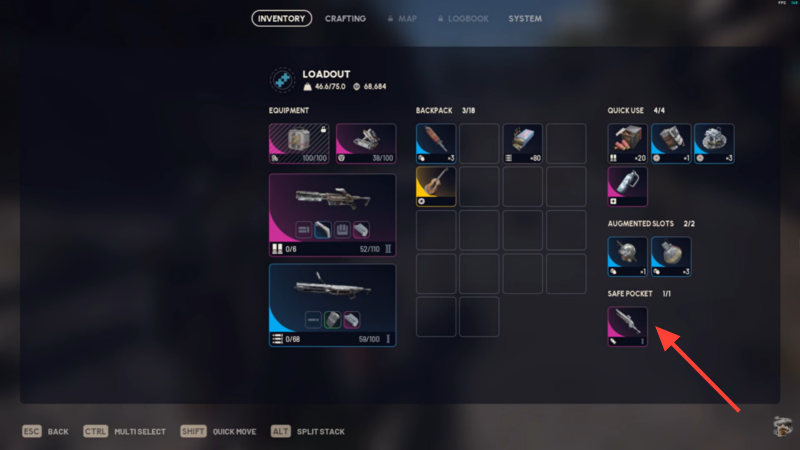
When you reconnect to the internet, you will hear the audio cue of the item hitting the ground. At this point, you drop the glitched version from your backpack as well and then pick the item up from the ground. Visually, the backpack slot appears empty, but internally, the game still believes the restricted item occupies that slot.
This is where the Safe Pocket interaction happens. When you drag the original Safe Pocket item into that “empty” backpack slot, the inventory system resolves the conflict by pushing the hidden item into the Safe Pocket instead. The result is a weapon or restricted gadget sitting inside a Safe Pocket, something the game normally blocks outright.
What items this exploit works on
Although most players focus on weapons, the exploit’s behavior is broader. Heavy gadgets, Hole Crackers, and even novelty items like guitars can be forced into Safe Pockets or other restricted slots if all valid slots are filled first.
| Item type | Normally allowed in Safe Pocket | Exploit result |
|---|---|---|
| Weapons | No | Yes (via exploit) |
| Heavy gadgets | No | Yes (via exploit) |
| Hull Cracker | No | Yes (via exploit) |
| Standard components | Yes | Yes (intended) |
Risks and warnings you should know
This exploit relies on intentionally disrupting your connection. Unplugging the router or modem instead of the device itself can cause longer outages, failed reconnections, or even corrupted sessions. The original creators of the method strongly warn against doing that.
More importantly, because this is an exploit, there is always a risk of rollback, item loss, or future penalties if Embark chooses to enforce stricter server checks. Even if no bans are currently associated with it, exploits like this are often silently fixed without notice.
Will this be patched?
Given that the exploit exists because of a post-patch 1.13 sync issue, it is highly likely that Embark will close this loophole in a future update. Safe Pockets are central to ARC Raiders’ risk-reward balance, and allowing weapons inside them—even unintentionally—cuts against the core design.
If you rely on this trick, you should assume it is temporary.