- What to know
- Arknights Endfield Recycling Stations details
- What a Recycling Station is in Arknights Endfield
- Locations of All Recycling Stations in Arknights Endfield
- Where to find Recycling Stations in Arknights Endfield
- How Recycling Stations work in Arknights Endfield
- How to unlock Recycling Stations in Arknights Endfield
- How to upgrade Recycling Stations
- What materials Recycling Stations produce
- What Aerospace Materials are used for
- How to use Recycling Stations efficiently
- Common mistakes to avoid while using Recyling Stations
- Using Recycling Stations as a Material farming device
What to know
- Recycling Stations are overworld resource nodes tied to regional development
- They generate Aerospace Materials used for ship and cabin upgrades
- Stations must be unlocked and can be upgraded for better yields
- Materials are claimed at fixed intervals, not infinitely
Recycling Stations are one of the most quietly important progression systems in Arknights Endfield. While they don’t look flashy, they act as a reliable source of Aerospace Materials, which directly gate upgrades for the OMV Dijiang and several long-term systems. If you ignore them, ship and cabin upgrades will eventually slow to a crawl.
This guide explains exactly how Recycling Stations work, where to find them, how to unlock and upgrade them, and how to use them efficiently as part of your regular exploration loop.
Arknights Endfield Recycling Stations details
| Category | Details |
|---|---|
| System type | Overworld resource facility |
| Primary output | Aerospace Materials |
| Unlock method | Regional Development |
| Upgrade levels | Multiple (tiered) |
| Collection method | Fixed-interval claim |
| Reset behavior | Automatic after interval |
What a Recycling Station is in Arknights Endfield
A Recycling Station is a fixed facility placed in the open world of Talos-II. Lore-wise, these stations convert accumulated residential or environmental waste into reusable Aerospace-grade materials. Mechanically, they function as semi-passive resource generators that reward exploration and regional progression rather than combat.
Once unlocked, a Recycling Station can be revisited repeatedly to claim materials, making it one of the few reliable, repeatable sources of Aerospace Materials outside of quests and milestones.
Visually, they are easy to recognize once you know what to look for:
- A compact platform with stacked yellow storage modules
- A vertical mast or pylon structure attached to the unit
- A clear interaction prompt when approached
Locations of All Recycling Stations in Arknights Endfield
| Region | Closest Area Name | Exact Landmark / Where to Stand |
|---|---|---|
| Originium Science Park | Research Center | On the path from Research Center toward Mountain Path Slope |
| Cliffside Mining Area | Meteorological Station | Directly beside the Meteorological Station building |
| Bonecrusher Warcamp / Plateau Trunkway | Evacuation Zone | Right on the Evacuation Zone marker near the road |
| Valley Transfer | Abandoned Trail entrance | East side of Valley Transfer, before the path becomes Abandoned Trail |
| Hub West | Old Water Plant | On top of the Old Water Plant area |
| Hub Base | Construction Site | In the Construction Site between Hub Base and Southern Meadows |
| AIC Research Area | Worker Dorms road | Outside AIC Research Center, along the road toward Worker Dorms |
Recycling Stations are scattered across the world regions in Arknights: Endfield — near hubs, exploration zones, and major paths.
- Use your map icons (owl-shaped) to plan routes so you can visit multiple stations in one exploration run.
- Since they reset daily, make a habit of including them in your daily exploration loop
Where to find Recycling Stations in Arknights Endfield
On the Talos-II world map, Recycling Stations are marked with a distinct owl-styled icon under the Resource category.
They appear in multiple regions across the map — these are scattered around major exploration zones, near other resource nodes like Mineral Beds and Rare Gathering Sites.
Recycling Stations are scattered across Talos-II and are usually placed along:
- Main exploration paths
- Near regional hubs
- Close to infrastructure nodes like pylons or transit points
They are marked on the map once discovered, making future visits easy.
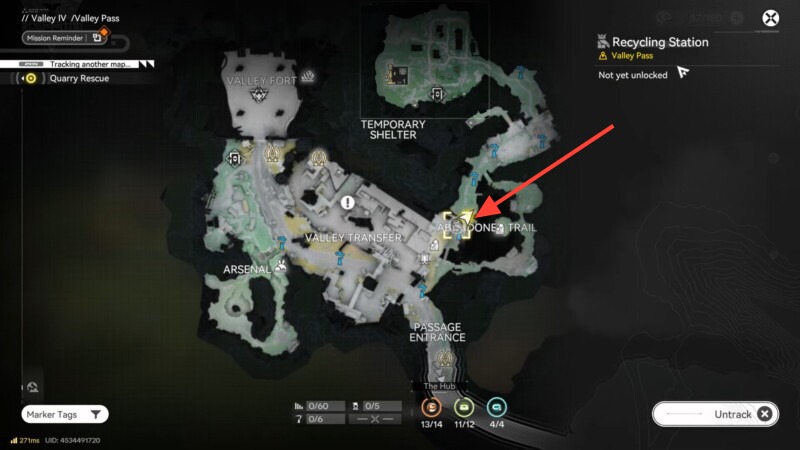
Rather than listing every exact coordinate, the best approach is to treat them as part of your exploration flow. If you’re moving through a region for quests or mapping, you’ll naturally encounter most of them.
How Recycling Stations work in Arknights Endfield
Recycling Stations operate on a claim-and-wait system rather than continuous interaction.
When you interact with a station, you collect all materials currently stored inside it. After that, the station enters a cooldown period and begins producing materials again automatically.
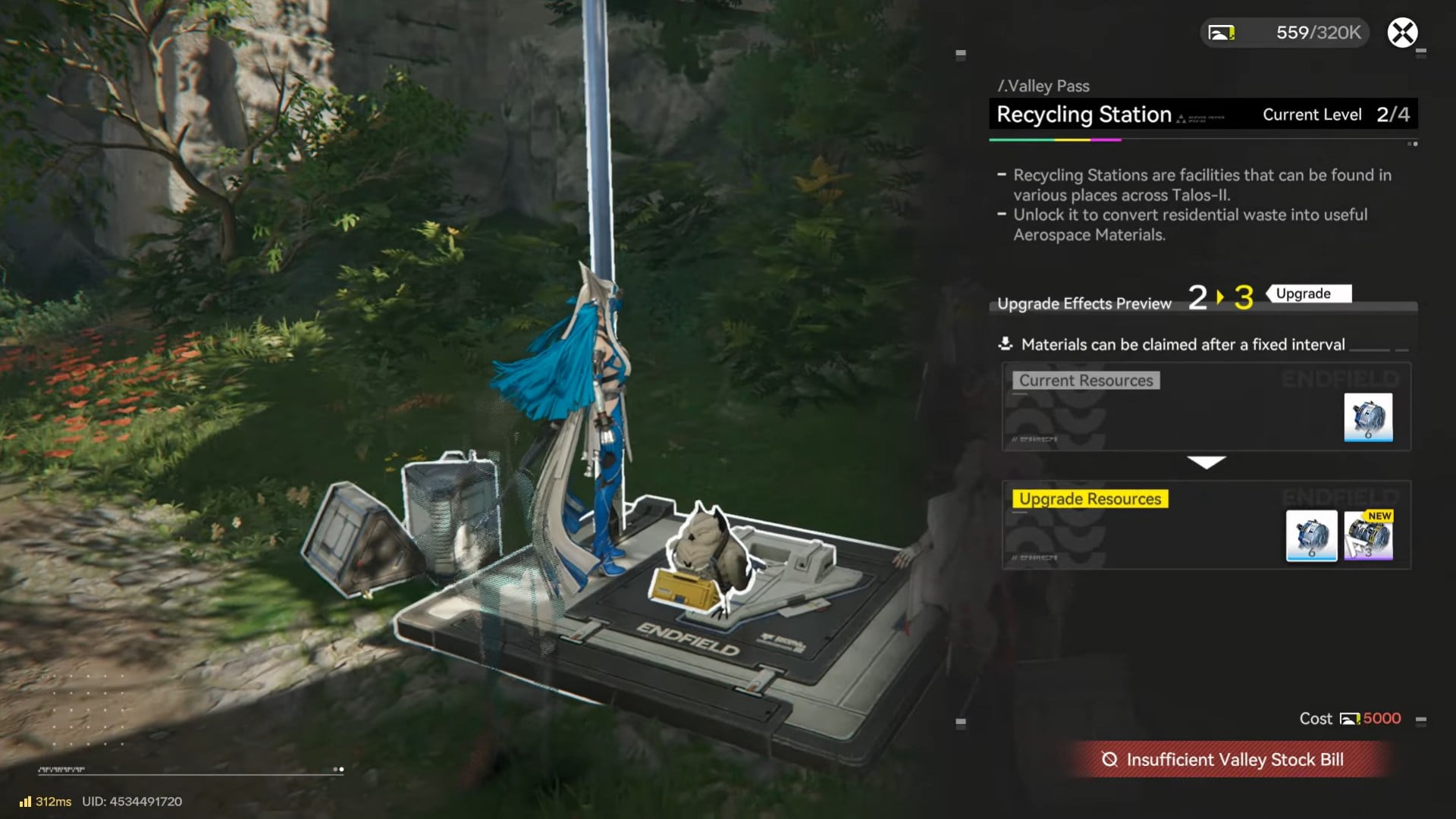
You do not need to supply items, power, or operators. Production continues in the background as long as the station remains unlocked.
Core mechanics at a glance
- Materials are generated passively
- You must manually collect them
- Output depends on station level
- Cooldowns are fixed and predictable
How to unlock Recycling Stations in Arknights Endfield
Most Recycling Stations are locked the first time you encounter them. Unlocking them is tied to regional progression rather than story combat.
Step 1: Reach the required region
Each station belongs to a specific region, such as Valley Pass or similar early-to-midgame zones. You must first have access to the region through normal exploration and story progression.

Step 2: Increase Regional Development Level
Recycling Stations unlock when your Regional Development Level reaches a certain threshold. This level increases by:
- Completing quests in the region
- Activating regional facilities
- Building or restoring infrastructure
- Advancing local objectives
Once the required level is reached, the station’s lock icon disappears and the unlock option becomes available.
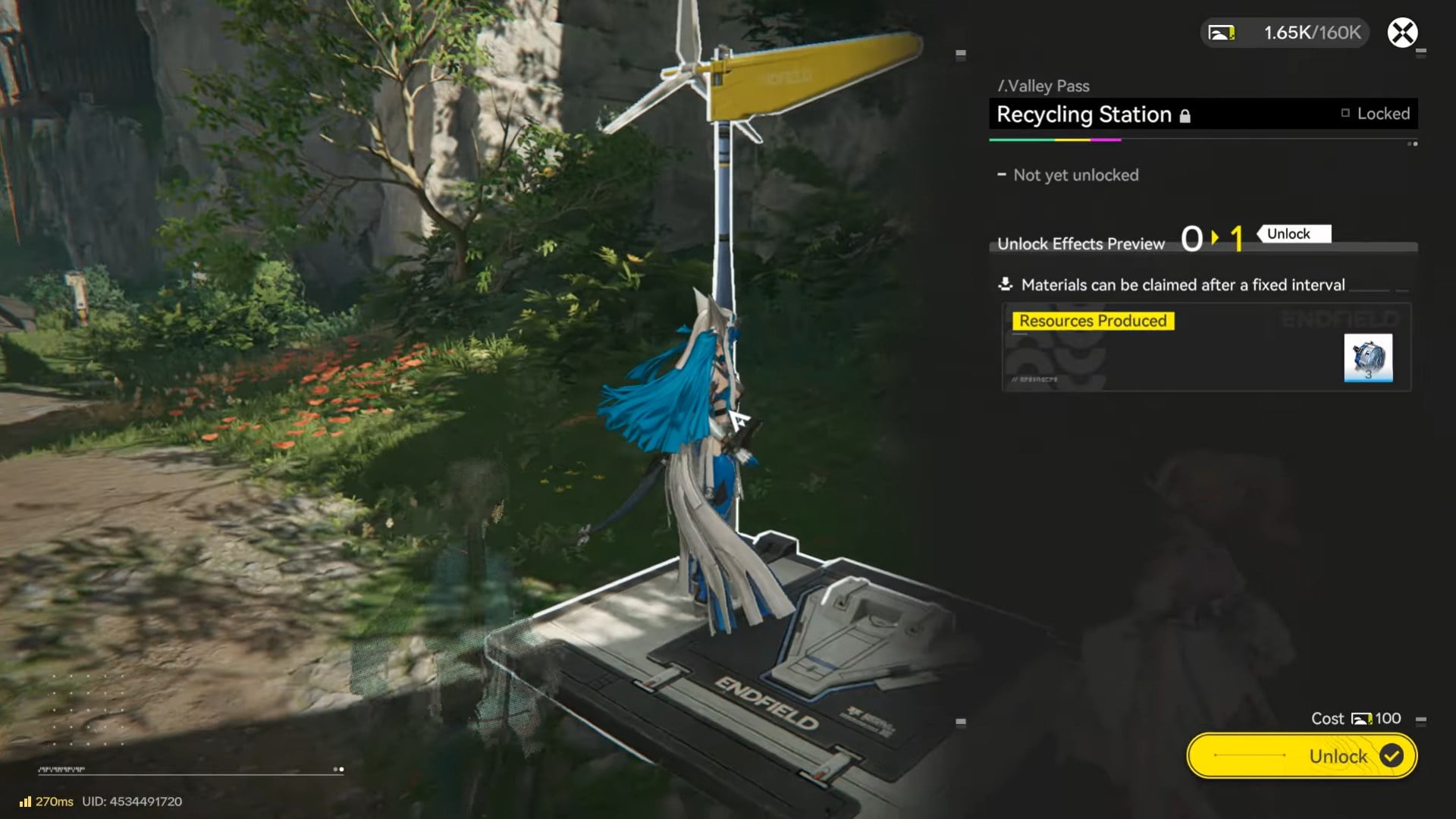
Step 3: Pay the unlock cost
Unlocking a station requires a small amount of regional currency or development points. After confirming, the station becomes active and immediately starts generating materials.
How to upgrade Recycling Stations
Upgrading a Recycling Station improves both the quantity and quality of materials it produces.
Step 1: Interact with the station
Approach the station and open its interface. If upgrades are available, you’ll see an Upgrade option alongside the Gather Resources prompt.
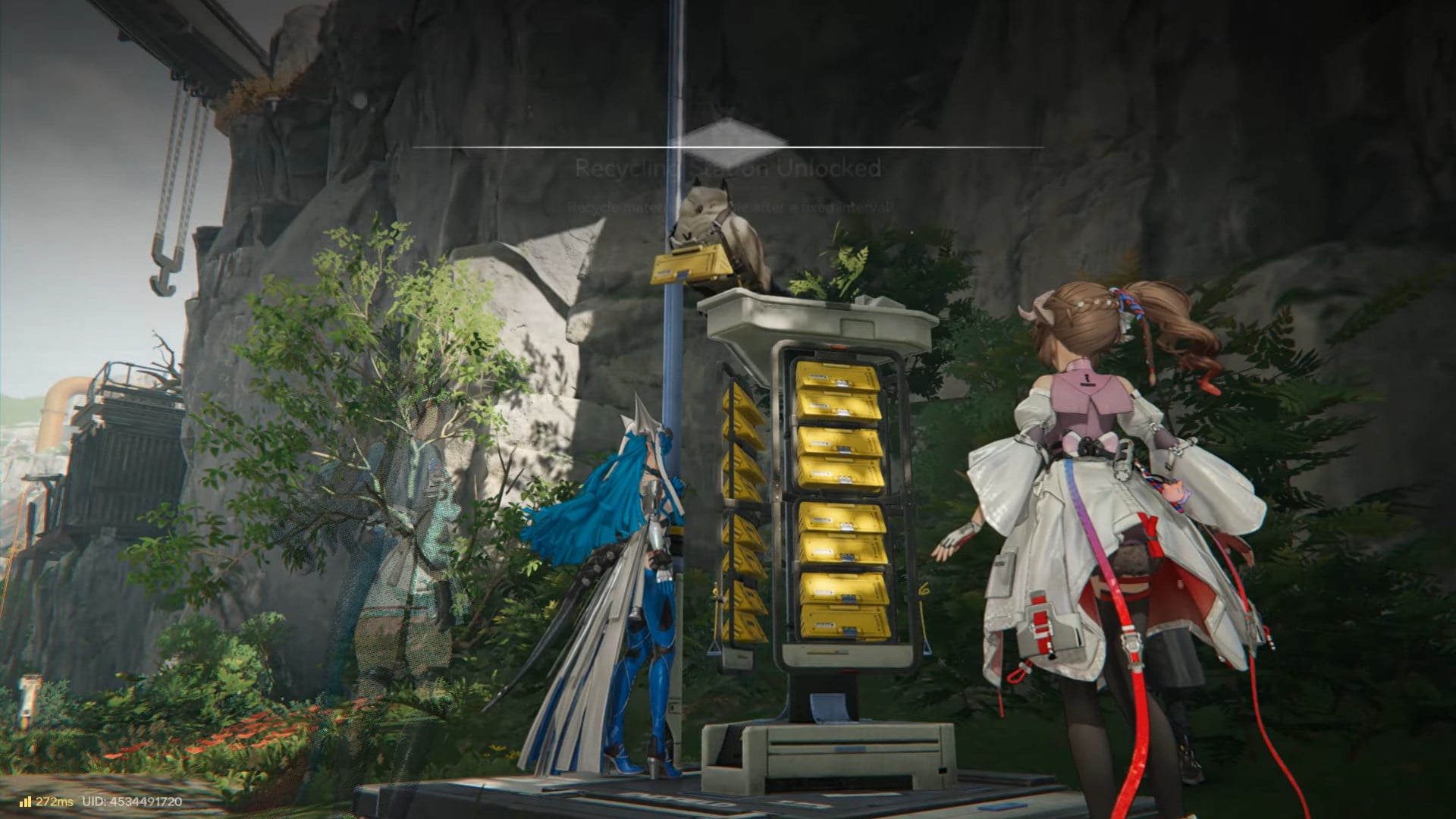
Step 2: Check upgrade requirements
Each upgrade tier has a cost, usually involving regional resources or development currency. Higher tiers may also require your Regional Development Level to increase further.
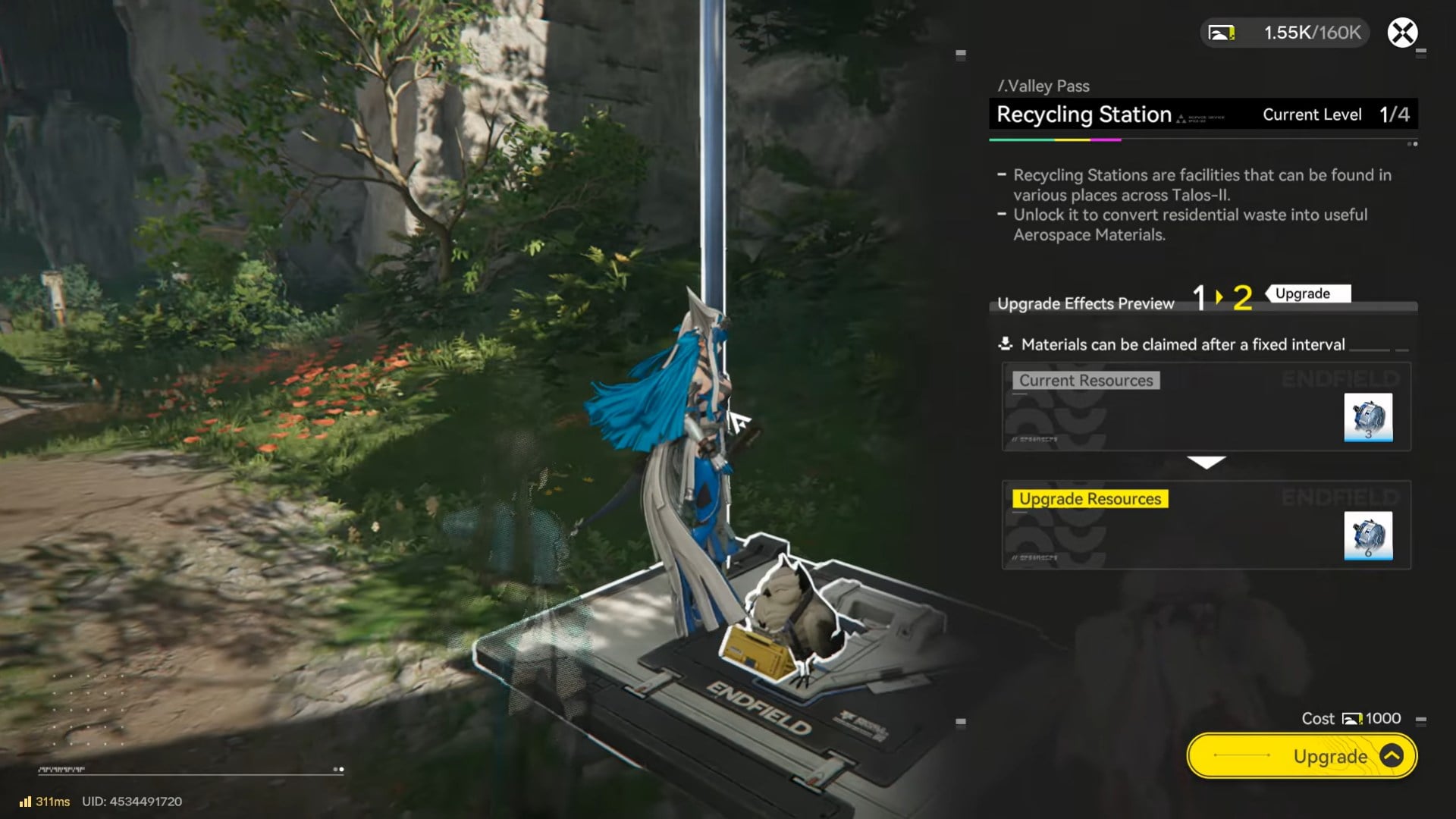
Step 3: Apply the upgrade
Once upgraded, the station’s production improves automatically. You don’t need to reactivate or reassign anything.
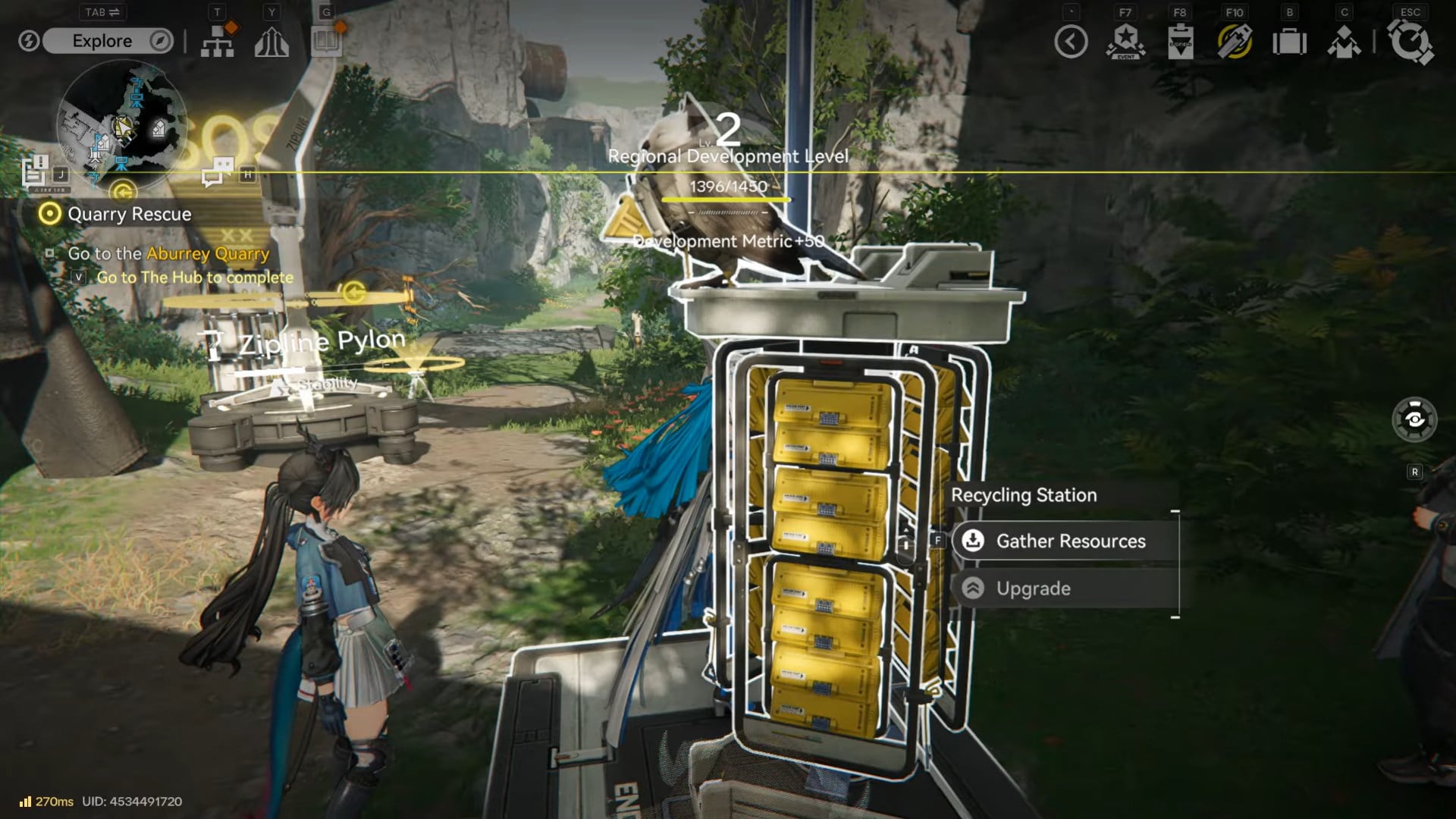
Upgrades are permanent and apply only to that specific station.
What materials Recycling Stations produce
The primary output of Recycling Stations is Aerospace Materials. These are core upgrade components used across multiple progression systems.
Aerospace Material types
| Material | Usage |
|---|---|
| Aerospace Material I | Early and mid-game cabin upgrades |
| Aerospace Material II | Higher-tier ship and system upgrades |
Higher-tier materials typically begin appearing after upgrading stations and increasing regional development.
What Aerospace Materials are used for
Aerospace Materials are a major progression bottleneck, which makes Recycling Stations especially valuable. They are used to:
- Upgrade OMV Dijiang cabins
- Unlock higher cabin tiers
- Improve production and utility modules
- Progress ship-wide systems tied to exploration and logistics
Without steady Aerospace Material income, several upgrades become delayed or inaccessible.
How to use Recycling Stations efficiently
Efficiency with Recycling Stations is about habit, not micromanagement.
Build a collection route
As you explore daily or revisit regions for quests, make short detours to nearby stations. Claiming materials takes seconds and adds up over time.
Upgrade stations early
Even a single upgrade significantly improves long-term returns. Prioritize upgrades in regions you visit often.
Don’t let materials cap unnoticed
While stations don’t overflow aggressively, leaving them uncollected for too long is wasted potential. A quick sweep every session keeps your Aerospace stock healthy.
Common mistakes to avoid while using Recyling Stations
- Ignoring locked stations instead of checking unlock conditions
- Forgetting to upgrade stations after unlocking them
- Treating Aerospace Materials as optional rather than core resources
- Only collecting from stations once and never revisiting
Recycling Stations are designed to be revisited. One-time use severely limits their value.
Using Recycling Stations as a Material farming device
Unlike quest rewards, Recycling Stations scale with your progression. As regions develop and stations are upgraded, they quietly turn into one of your most consistent sources of high-value materials.
They also reinforce Endfield’s design philosophy: exploration and regional investment are just as important as combat when it comes to long-term power growth.
Recycling Stations may look simple, but they play a critical role in Endfield’s progression loop. By unlocking them through regional development, upgrading them when possible, and collecting their output regularly, you secure a steady supply of Aerospace Materials that keeps your ship and systems advancing smoothly. Treat them as part of your routine, and you’ll never feel starved for upgrades.
Thanks for taking the time to go through this Recycling Stations guide for Arknights Endfield. If it helped you understand things better, do share your thoughts, impressions, or doubts in the comments section. We keep a close watch and try to respond promptly to ensure you always get the support you need.