- What to know
- Arknight Endfield zipline quick overview
- How to craft ziplines in Arknights Endfield
- How to use a zipline in Arknights Endfield
- Why zipline attempts sometimes fail
- How ziplines fit into exploration and mission flow
- Advanced zipline usage tips
- Common controller inputs recap
- How ziplines differ from other traversal tools
- Situational awareness while ziplining
- How to practice zipline usage safely
- Why mastering ziplines matters in Endfield
What to know
- Ziplines are contextual traversal tools used in specific Endfield zones
- Camera control and target selection determine success
- Movement uses trigger inputs rather than automatic travel
- You can manually release mid-ride for advanced positioning
In Arknights: Endfield, traversal is more than just moving from point A to point B. The game’s open-ended zones, vertical level design, and layered environments demand tools that let you navigate smartly—and the zipline is one of the most important among them.
Unlike simple auto-travel systems seen in many RPGs, Arknights Endfield’s zipline mechanic is deliberately hands-on. You don’t just latch on and ride; you actively aim, confirm, move, and disengage. This gives you control, but it also means mistakes are possible if you rush or ignore visual cues.
This guide walks you through exactly how to use ziplines, explains why they sometimes fail, and shows how to use them efficiently during exploration and missions.
Arknight Endfield zipline quick overview
| Aspect | Details |
|---|---|
| Purpose | Fast traversal across gaps and vertical spaces |
| Activation | Manual interaction + camera targeting |
| Movement | Controlled using triggers |
| Release | Manual disengage |
| Failure risk | Incorrect target selection or poor camera alignment |
How to craft ziplines in Arknights Endfield
In Arknights: Endfield, ziplines are a traversal structure you unlock and place through the AIC (Automated Industry Complex) base-building system — they aren’t crafted like normal consumables but built as facilities once unlocked in the tech plan. Ziplines allow fast travel between zipline towers by connecting two towers within range and letting your character zip across terrain obstacles without walking.
How to Unlock & Build Ziplines
- Progress AIC Tech (Field Mobility II)
- Ziplines become available after you unlock the Field Mobility II node in the Basic AIC Plan tech tree.
- Place Zipline Towers
- Once unlocked, build Zipline Towers within your powered network (via relay/electric towers). These serve as launch and target nodes for your zip routes.
- Connect Towers in Range
- Place a second tower within ~110 m of the first, then link them to form an active zipline route.
- Use in World
- Approach a linked zipline tower and trigger the travel prompt — hold the interaction button and travel to the next node.
Crafting / Requirements at a Glance
| Step | Action | Requirements |
|---|---|---|
| Tech Unlock | Field Mobility II in AIC Plan | AIC tech progression points |
| Facility Build | Zipline Tower placement | Factory resources & power grid |
| Zipline Setup | Connect two towers | Within ~110 m |
Tip: Ziplines are especially useful for exploration across rugged terrain or reaching remote resource nodes in the open world.
In some zones, ziplines are optional shortcuts that you make for your travel. In others, they are the intended route forward, like in quests and encounters, especially when terrain elevation or enemy density would otherwise stall progress.
How to use a zipline in Arknights Endfield
Using a zipline is a multi-step interaction. Each part matters, and skipping one usually leads to failure.
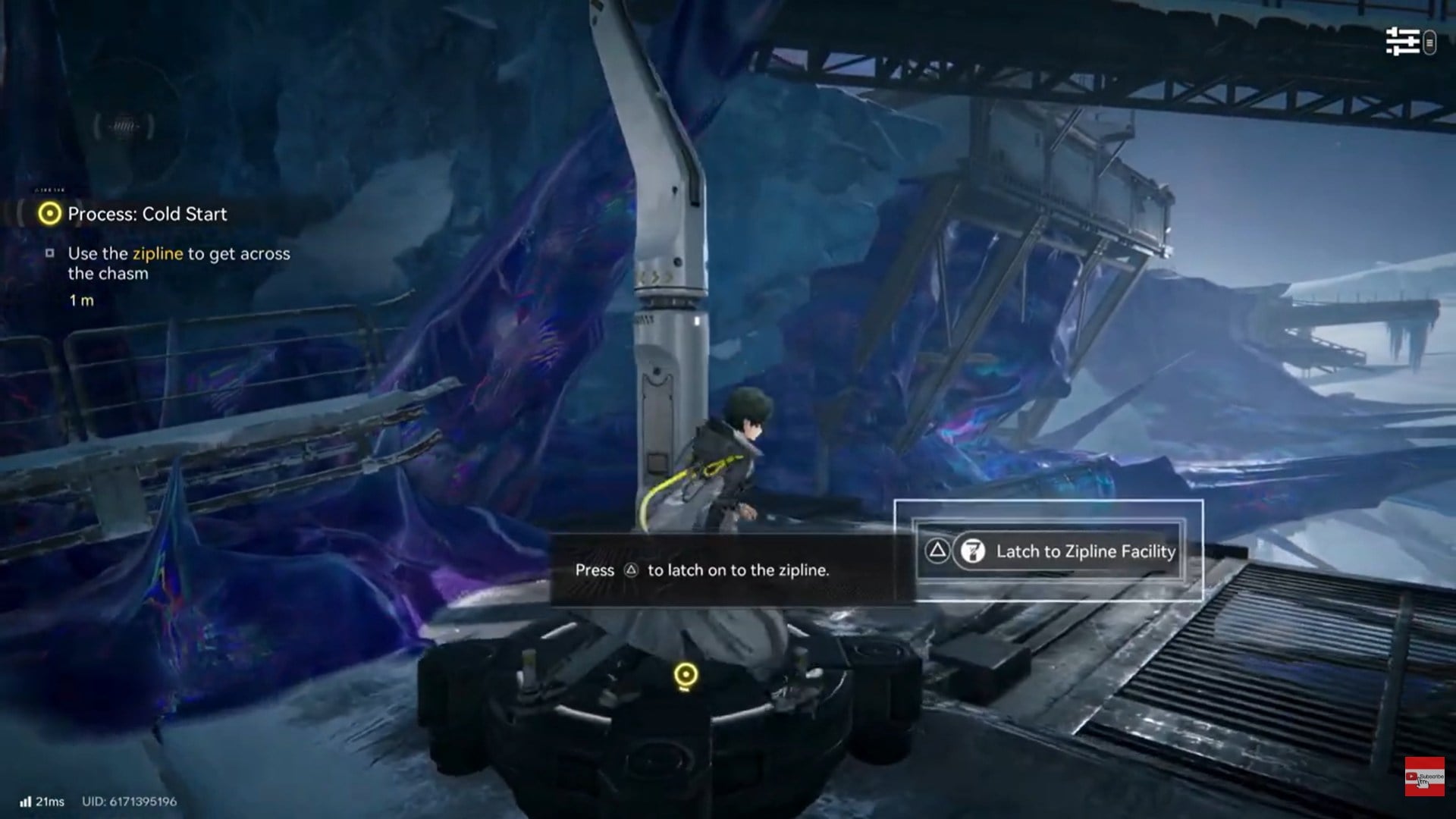
Step 1: Approach and interact with the zipline
Move close to the zipline anchor point until the interaction prompt appears.
On PlayStation controllers, press the Triangle button to initiate the zipline interface.
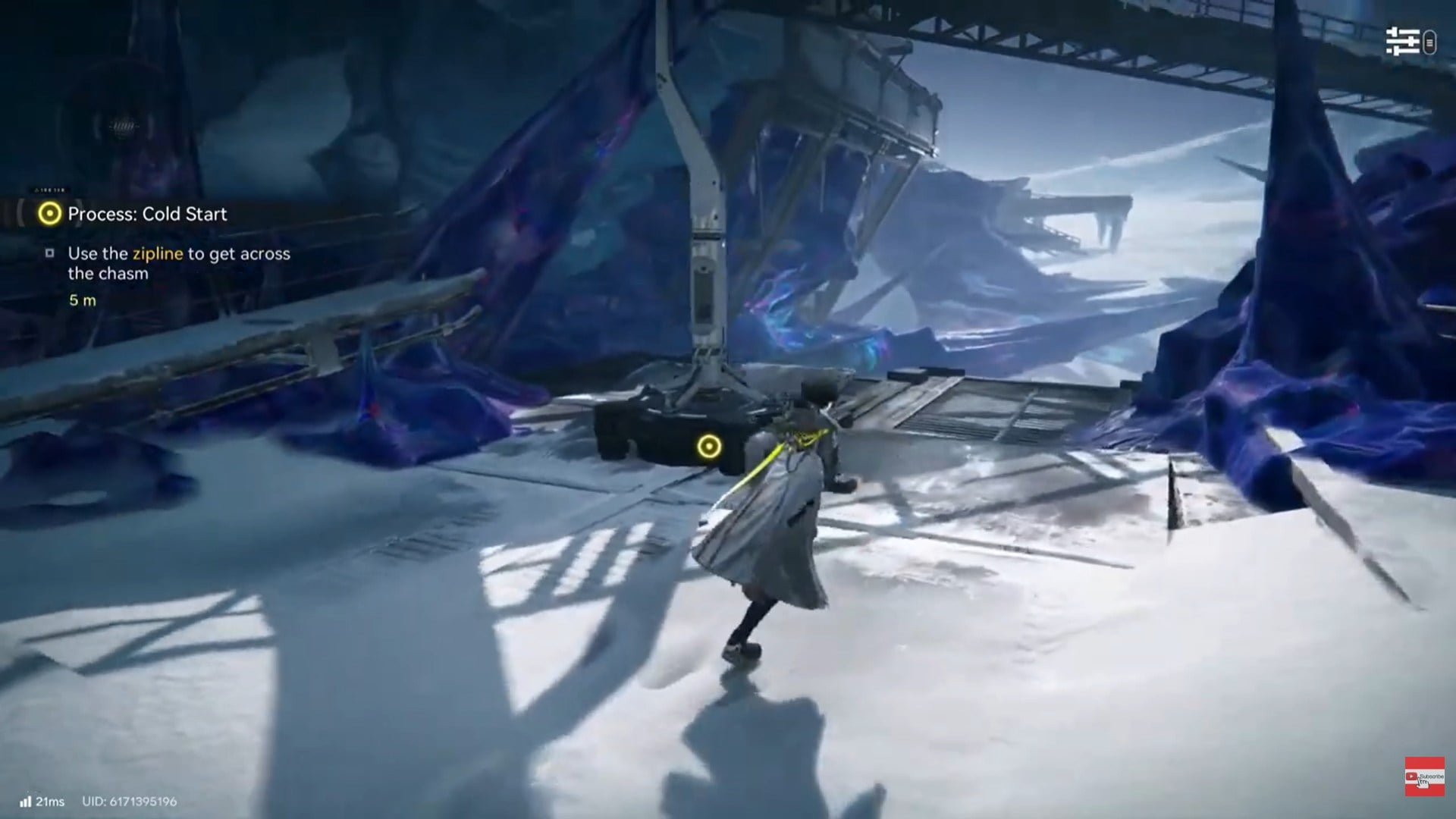
This does not immediately launch you. Instead, it places you in targeting mode, where camera control becomes essential.
Step 2: Adjust the camera and select your target
Once connected, the game expects you to manually aim the zipline destination.
Use the right stick to rotate the camera and visually align with a valid anchor point or landing node. These targets are usually highlighted subtly or positioned along a visible cable path.
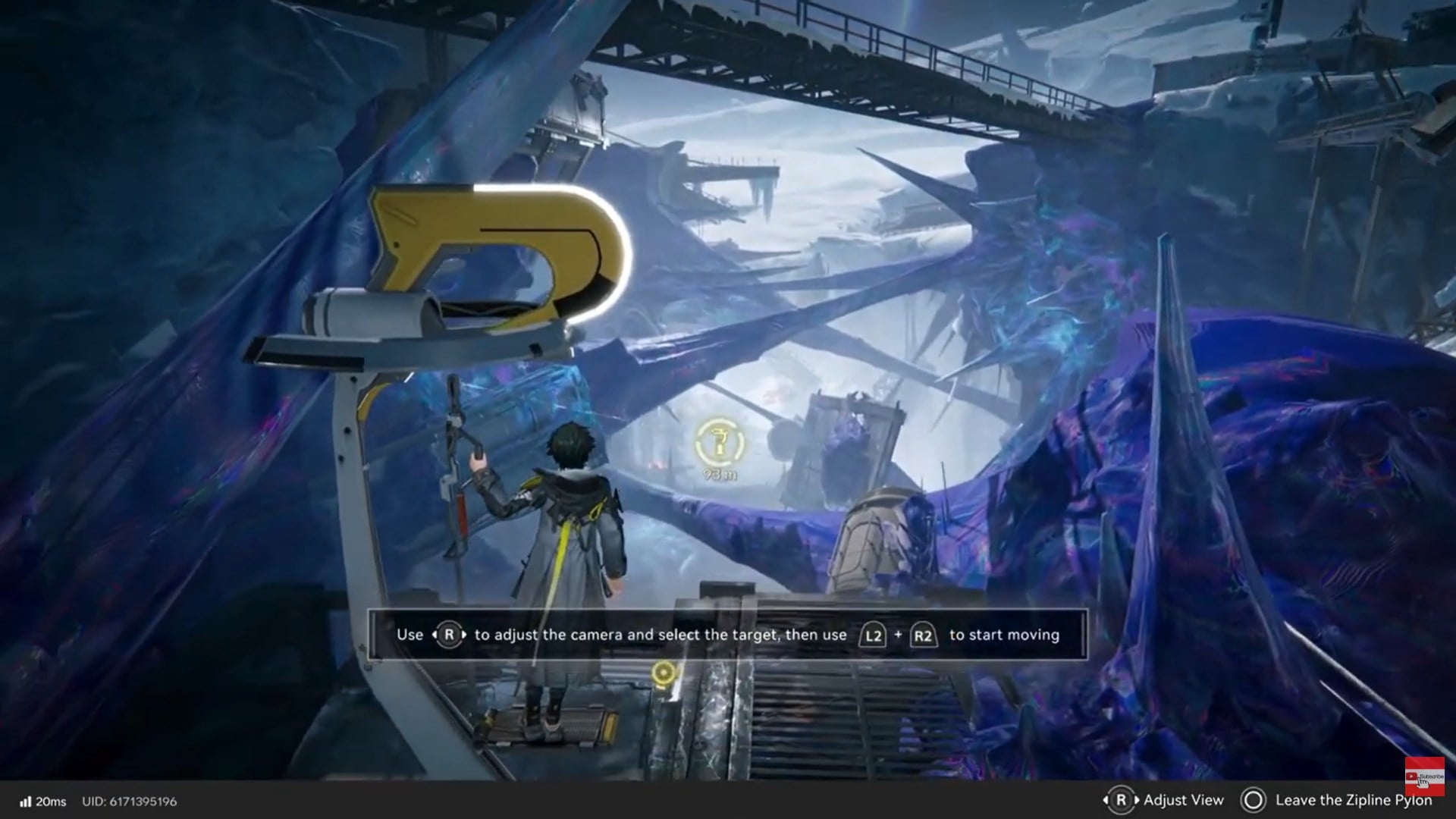
Take your time here. If the camera is off-angle or the wrong point is selected, the zipline will not function correctly.
Step 3: Confirm movement with L2 and R2
After your target is aligned, press L2 and R2 together to begin moving.
This is a deliberate input choice. Endfield does not auto-launch you, which prevents accidental movement but also means you must confirm intentionally.
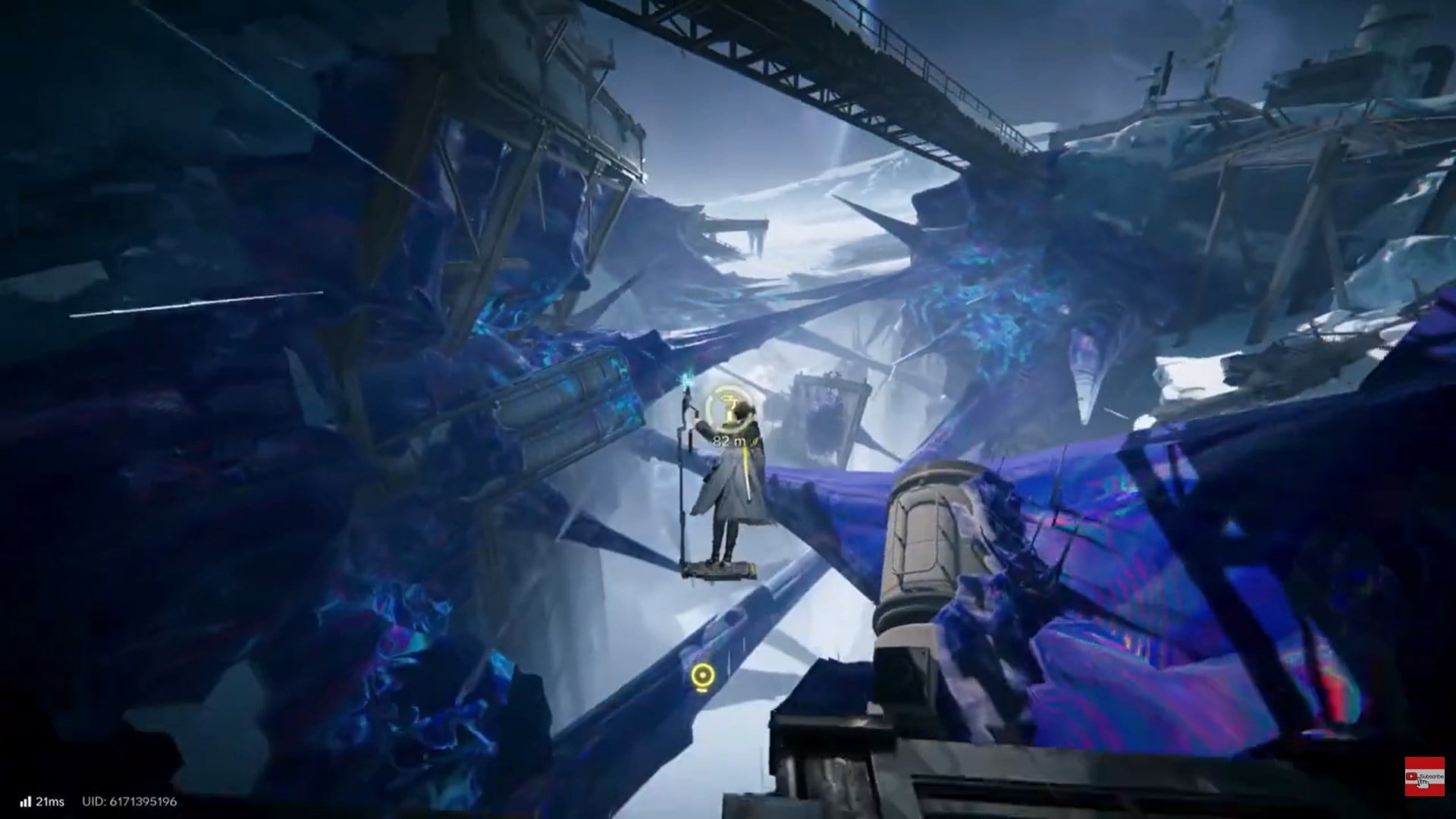
Once activated, your character begins traveling along the zipline toward the selected destination.
Step 4: Maintain correct alignment during traversal
While moving, the camera angle still matters. Although you don’t need to constantly adjust, abrupt camera changes or misalignment can sometimes interrupt the movement if the system loses clarity on the target.
This is especially important on longer ziplines or when the destination platform is narrow.
Step 5: Release from the zipline
When you reach your destination—or if you want to disengage early—press the Circle button to release.
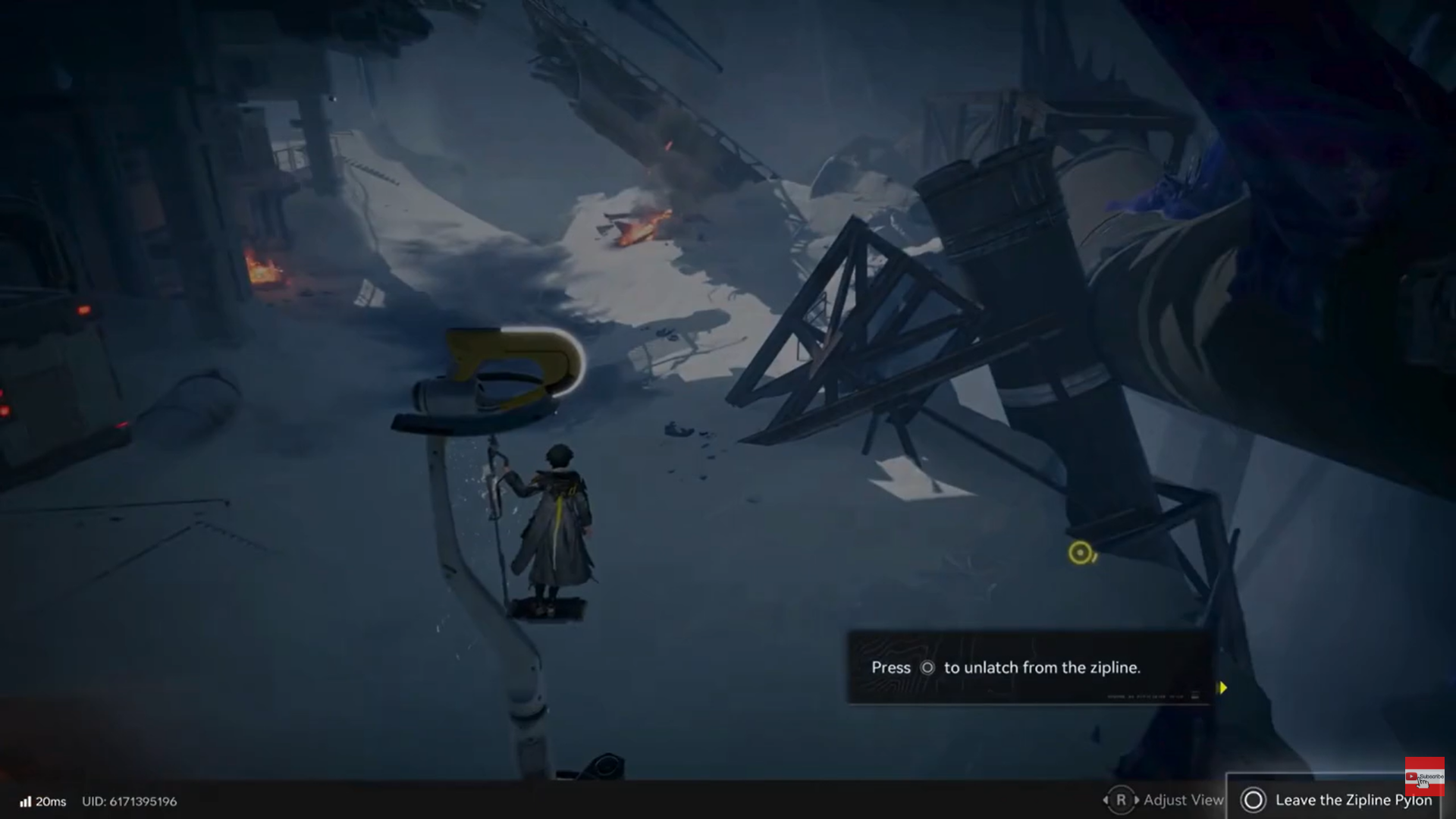
Releasing early can be useful for landing on intermediate platforms or dropping into hidden paths, but it also carries risk if you misjudge distance or height.
Why zipline attempts sometimes fail
Zipline failures are rarely random. They usually stem from one of a few common issues.
Incorrect target selection
The most frequent cause is locking onto the wrong point. Some environments contain multiple visual elements that look usable but are not valid zipline anchors.
Always confirm the intended endpoint before pressing the movement triggers.
Poor camera alignment
If the camera is angled too far off-center, the game may not register a valid trajectory. This is especially common when rushing the interaction.
Center the destination clearly on-screen before proceeding.
Premature trigger input
Pressing L2 and R2 before the target is properly selected can cancel the interaction entirely, forcing you to start again.
How ziplines fit into exploration and mission flow
Ziplines are not just traversal gimmicks. They influence how you approach exploration.
In open zones, they often:
- Reveal alternate routes that bypass enemy clusters
- Connect elevated resource nodes
- Shorten backtracking paths after objectives
During missions, ziplines may act as soft progression gates, ensuring you’ve reached a certain vantage point or cleared a nearby area before advancing.
Learning to recognize zipline placement helps you read level design more effectively and anticipate where the game wants you to go.
Advanced zipline usage tips
Once you’re comfortable with the basics, ziplines become tools for efficiency rather than just movement.
Use early release for exploration
Releasing slightly before the endpoint can drop you onto ledges or platforms that aren’t obvious from ground level. These areas sometimes contain resources or alternate paths.
Combine with momentum awareness
Although Endfield doesn’t heavily emphasize physics-based momentum, releasing at different points can change landing positions slightly. With practice, you can fine-tune where you touch down.
Reorient the camera before interacting
Approach ziplines while already facing the general direction you want to travel. This reduces adjustment time and lowers the chance of mis-targeting.
Common controller inputs recap
| Action | PlayStation Input |
|---|---|
| Interact with zipline | Triangle |
| Adjust camera | Right Stick |
| Start movement | L2 + R2 |
| Release | Circle |
How ziplines differ from other traversal tools
Unlike ladders or elevators, ziplines require active engagement. You’re responsible for:
- Selecting the path
- Confirming movement
- Deciding when to disengage
This design keeps traversal interactive and prevents it from becoming passive downtime between combat or story beats.
It also means mastery feels earned. When you glide cleanly across a complex area without stopping or misfiring, it’s a direct result of your input—not automation.
Situational awareness while ziplining
Although you are largely safe during zipline travel, situational awareness still matters.
- Watch enemy patrols near landing zones
- Avoid releasing into contested areas without a plan
- Use the camera to scout ahead before committing
Because you control when movement starts, you can pause briefly to read the environment instead of rushing forward blindly.
How to practice zipline usage safely
If you’re still getting used to the mechanic, practice in low-risk zones where falling or mislanding doesn’t punish you heavily.
Focus on:
- Camera centering speed
- Recognizing valid targets
- Timing releases accurately
Once these become muscle memory, ziplines stop feeling complex and start feeling fluid.
Why mastering ziplines matters in Endfield
Ziplines in Arknights: Endfield are more than traversal shortcuts—they are expressions of the game’s design philosophy. You are given freedom, but that freedom comes with responsibility.
By learning how to properly aim, confirm, move, and release, you turn ziplines into reliable tools rather than frustrating obstacles. Over time, they become second nature, letting you move confidently through Endfield’s layered environments without breaking pace or immersion.
Master them early, and the world opens up faster, smoother, and more intelligently around you.
We hope this zipling using guide for Arknights: Endfield offered all the clarity you were looking for and made your experience smoother. If you have any feedback, suggestions, or questions, drop them in the comments below. We actively read and respond, so feel free to reach out whenever you need extra help or guidance.