What to know
- Live Now badge: Profiles can display a LIVE badge indicating an active Twitch stream.
- Direct link: Tapping the badge opens the streamer’s Twitch broadcast.
- Latest rollout: The feature is part of Bluesky v1.114, now widely available.
- Not native live: Bluesky doesn’t host video — it links out to Twitch.
Bluesky has officially rolled out its “Live Now” badge feature to all users, letting you see when someone is streaming live on Twitch directly from their profile. The change comes as part of the platform’s v1.114 update, a broader effort that also includes new tools like cashtags for stock-related posts — updates arriving amid a recent surge in app installs.
The Live Now badge was previously available only in limited beta testing. Now, anyone on Bluesky can use this feature: when a user begins a Twitch livestream and links it to their profile, a red “LIVE” indicator appears on or near their avatar. Tapping this badge takes Bluesky users straight to the streamer’s Twitch broadcast, making it much easier to discover real-time content without hunting through posts.
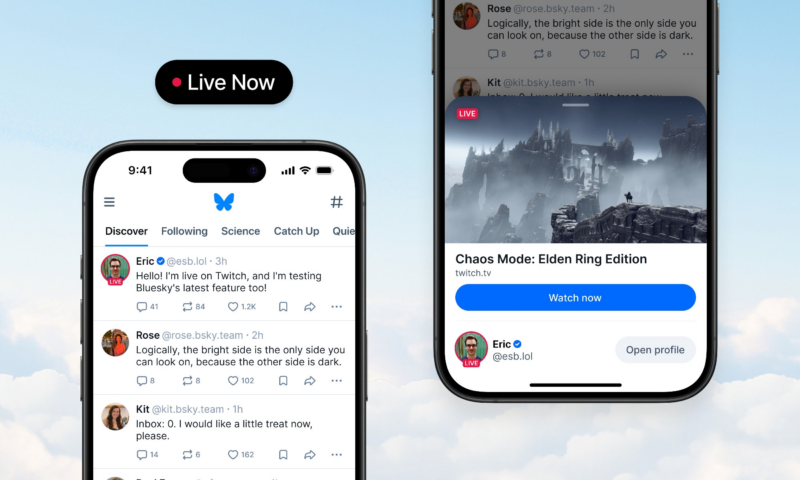
This rollout is notable because Bluesky itself does not host live video — instead, the badge functions as a clear bridge to live streams on another platform. While it currently supports Twitch only, Bluesky has suggested that other streaming services might be supported later if the beta results justify expansion.
How the LIVE NOW badge works on Bluesky
When a streamer starts a broadcast on Twitch and has set their Bluesky profile to link to that broadcast, Bluesky can show a LIVE badge on their avatar or profile picture. This badge is temporary — it appears only while the stream is active.
In practical terms:
- Profile indicator: The streamer’s avatar gets a visual cue (often a red “LIVE” label or badge) when they’re currently streaming on Twitch.
- Tap to watch: Clicking or tapping that badge takes you to the Twitch livestream page for that stream.
- Elsewhere in feed: Some users may also announce their Twitch stream in Bluesky posts; tapping those links takes you to Twitch too.
Why this matters
Bluesky itself doesn’t host live video like Twitch — it’s a microblogging/social platform — so the Live Now badge is a discovery tool. It helps your followers quickly see when you’re on air without having to guess or scroll for manual posts.
Important details
- The LIVE badge feature is part of the v1.114 update and has moved past limited beta testing into broader availability.
- As of January 2026, the badge only supports Twitch links (Bluesky may expand support to other livestream platforms in the future).
- Bluesky continues to emphasize linking outward to external streams rather than hosting video itself.
For streamers and followers alike, the addition of the live badge simplifies cross-platform engagement. Creators can flag their active streams to followers with a visual cue that’s hard to miss, and viewers can instantly jump into live broadcasts — all without leaving Bluesky until they tap through.
As social networks compete for attention and user loyalty in 2026, updates like this show how Bluesky is emphasizing openness and real-time connection — letting users share what they’re doing now, even when that content lives outside the platform itself.