What to know
- Turning off the HUD can significantly boost FPS in Hytale
- The performance gain appears most noticeable on mid-range systems
- HUD elements still seem to consume rendering resources even when idle
- This is likely an optimization issue, not intended final behavior
Players testing performance in Hytale have discovered that disabling the in-game HUD can lead to an unexpectedly large FPS increase. In some cases, users reported jumps of around 60 FPS simply by turning off HUD elements, without changing resolution, graphics quality, or world settings.
This finding has sparked discussion because HUDs are usually lightweight overlays. In Hytale’s current build, however, the HUD appears to be more performance-intensive than expected.
What is the Hytale FPS boost discovery about
| Aspect | Details |
|---|---|
| Change made | HUD disabled |
| Reported FPS gain | Up to ~60 FPS |
| Affected systems | Mostly mid-range PCs |
| Likely cause | HUD rendering or UI update overhead |
| Status | Community-observed, not officially addressed |
What players observed during testing
Players compared performance in the same area, facing the same direction, with identical settings—changing only whether the HUD was enabled.
With the HUD on, FPS remained noticeably lower. Once disabled, frame rates jumped immediately and remained stable. This suggests the performance hit is tied directly to HUD rendering rather than world simulation, lighting, or entity count.
How to disable the HUD in Hytale
Notably, the gain was not a minor improvement. For some players, it represented a shift from barely playable to smooth gameplay.
- Open the in-game Settings menu from the launch page.
- Navigate to User Interface > Hide HUD option.
- Disable the HUD or toggle off individual HUD elements
- Return to gameplay and compare FPS with and without the HUD enabled.
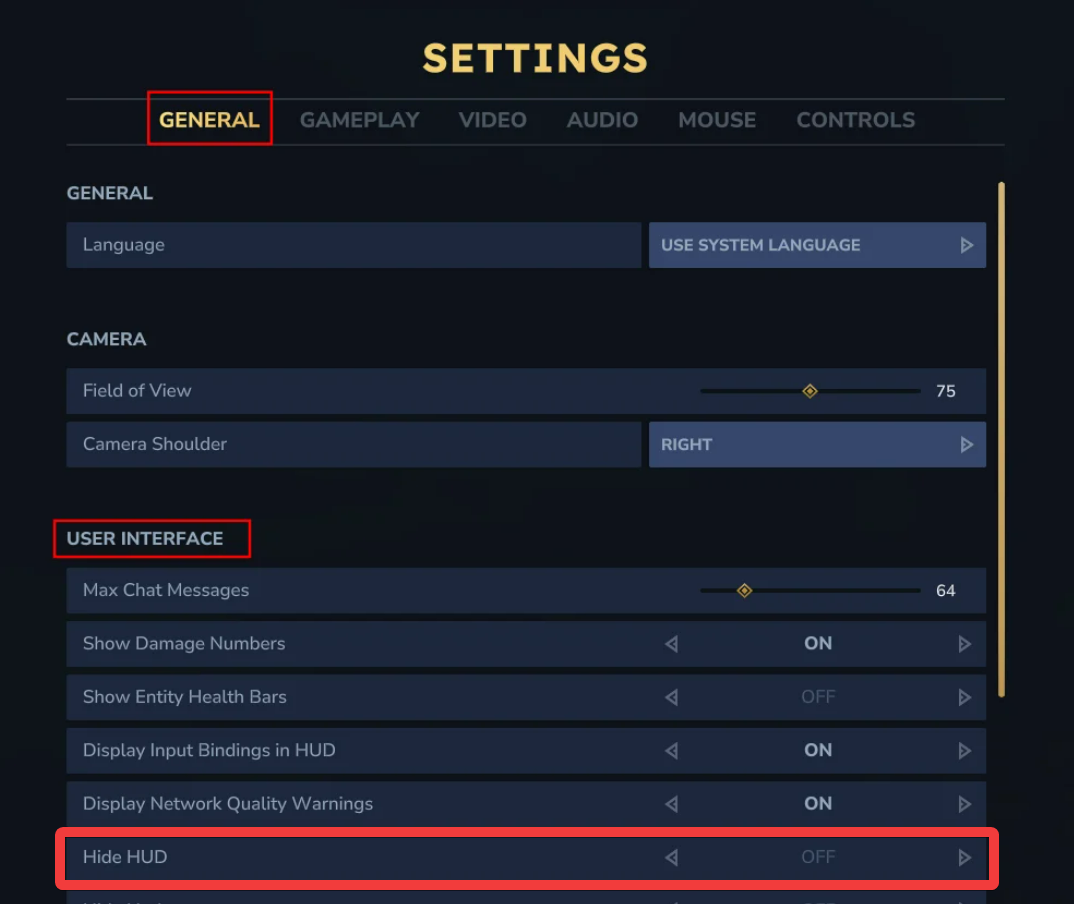
If a full HUD toggle is not available in your build, reducing or disabling individual UI elements may still provide partial gains.
Why the HUD might affect performance so heavily
While there is no official technical breakdown yet, several plausible explanations exist based on how UI systems are commonly built.
Constant UI redraws
HUD elements such as health bars, stamina meters, minimaps, and status icons may be updating every frame instead of only when values change. If so, this could create unnecessary GPU and CPU overhead.
Script-heavy UI logic
If HUD elements rely on scripting rather than lightweight rendering, they may be executing frequent logic checks even when nothing changes on screen.
Early access optimization gaps
Hytale is still in active development. UI optimization often happens later in production, meaning the HUD may not yet be optimized for performance efficiency.
Trade-offs of playing without the HUD
Disabling the HUD is not a perfect solution, and there are clear downsides.
| Advantage | Drawback |
|---|---|
| Large FPS boost | No visible health or energy bars |
| Smoother camera movement | Reduced combat awareness |
| Lower system strain | Less accessibility for new players |
For exploration or performance testing, the trade-off may be worth it. For combat-heavy gameplay, losing HUD feedback can be risky.
Thanks for checking out these FPS boosting tips for Hytale. If you found them helpful, please share your thoughts or questions in the comments. We monitor this closely and respond quickly to provide you with the support you need.